TWO STRENGTHS. ONE APP.两大核心,一个应用。ふたつの強みを、ひとつに。DOS PILARES. UNA APP.

Look closer.
Take it further.
看得更细。
也做得更多。
もっと細かく。
もっと自由に。
Mira más de cerca.
Llega más lejos.

01 / PROFESSIONAL COMPARISON专业查看与对比本格的な比較COMPARACIÓN PROFESIONAL

Look closer. See more.看得更细,也看得更清。もっと細かく、もっとクリアに。Mira más de cerca. Ve más.

01 / 03

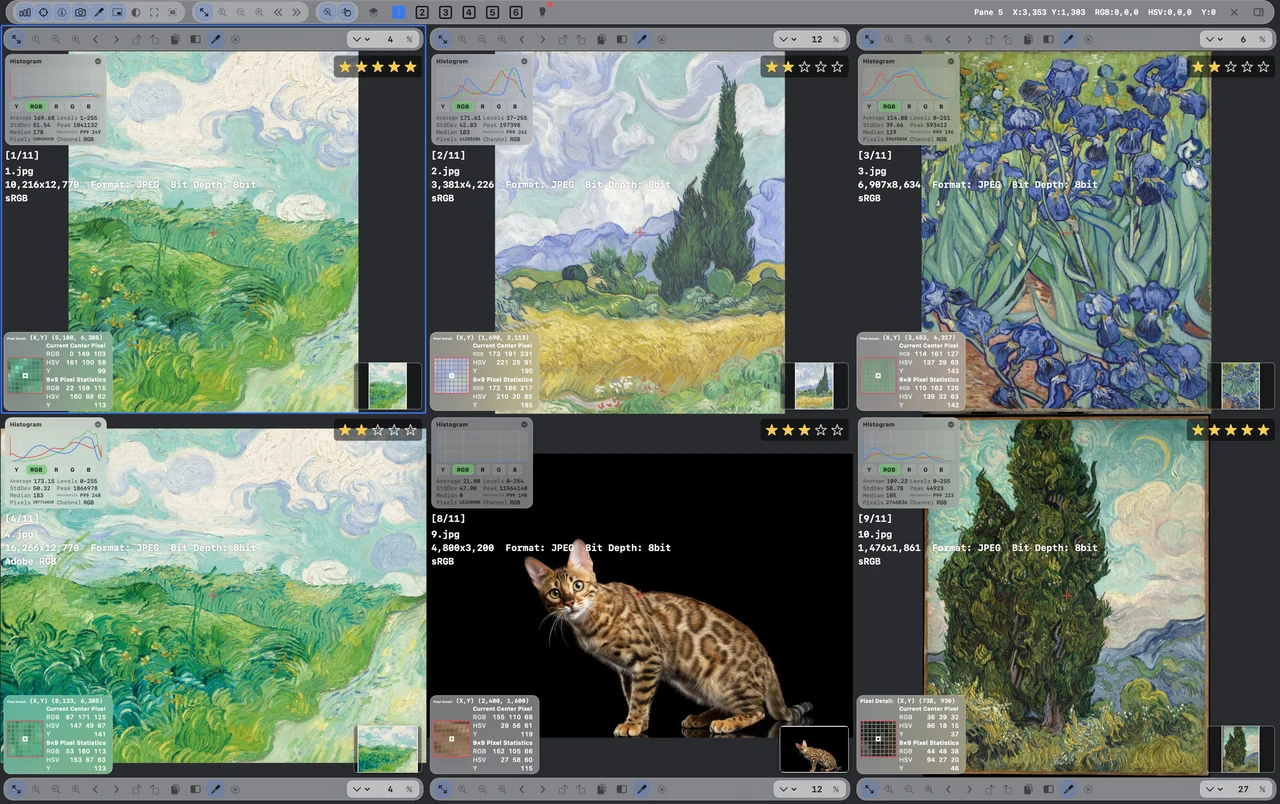
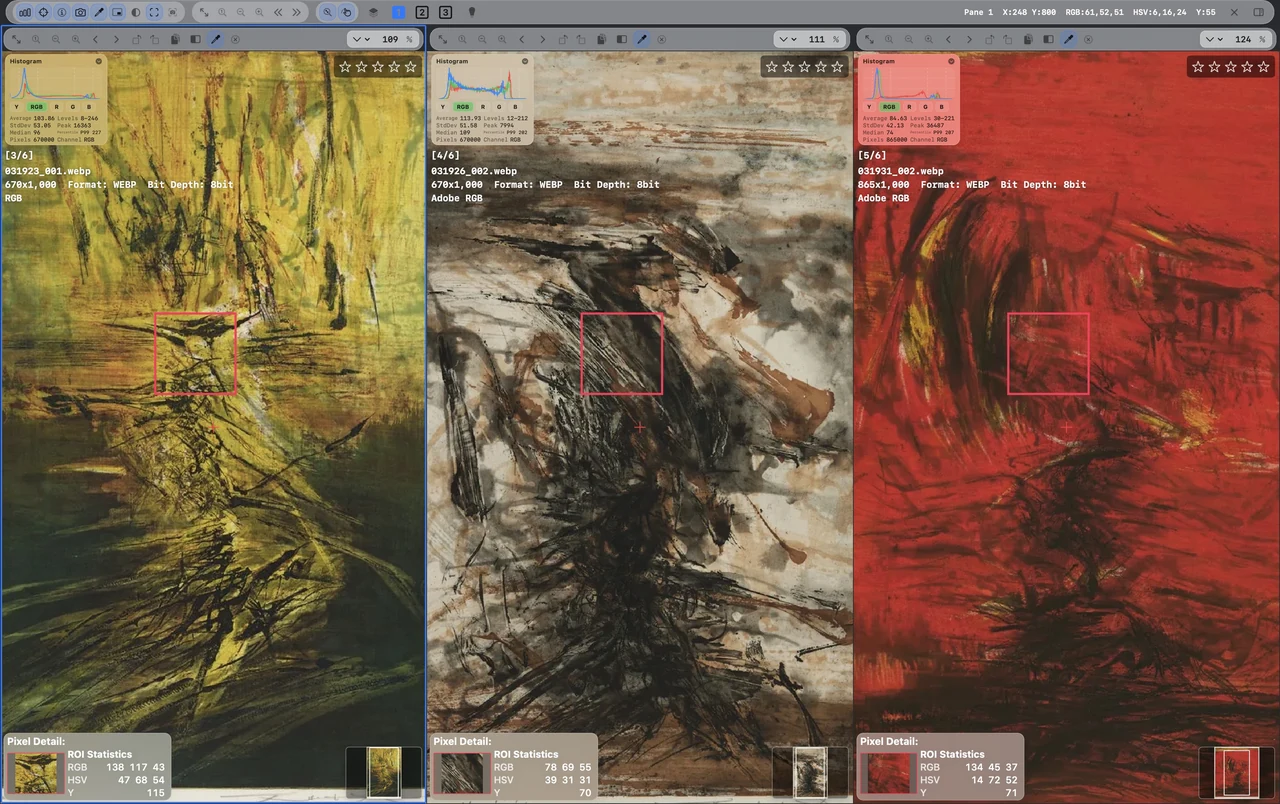
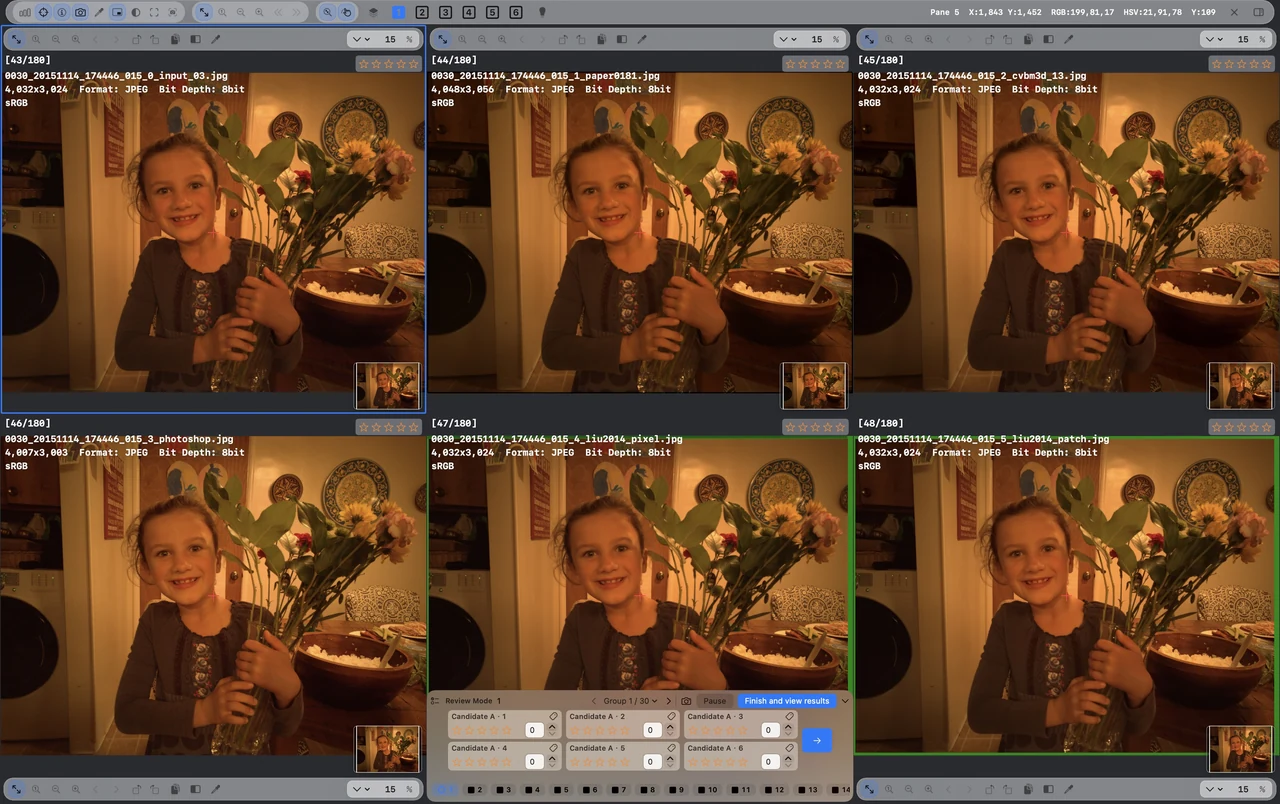
Six images. One clear comparison.

Compare two to six images with synchronized zoom and pan.

01 / 03

Six images.
One clear comparison.
六图,同一视野。6 枚を、ひとつの視点で。Seis imágenes.
Una comparación clara.

Compare up to six images with synchronized zoom and pan. Keep each version on the same detail.最多六张图片同步缩放与平移。比较版本、筛选作品,让每张图都聚焦同一处细节。最大 6 枚を同期ズーム・パンで比較。同じ細部を見ながら、候補や仕上がりを選べます。Compara hasta seis imágenes con zoom y desplazamiento sincronizados, siempre sobre el mismo detalle.

Six images. One perspective.
02 / 03

Small changes.
Clearly visible.
差异,不再靠猜。小さな違いを、はっきりと。Cambios pequeños.
Claramente visibles.

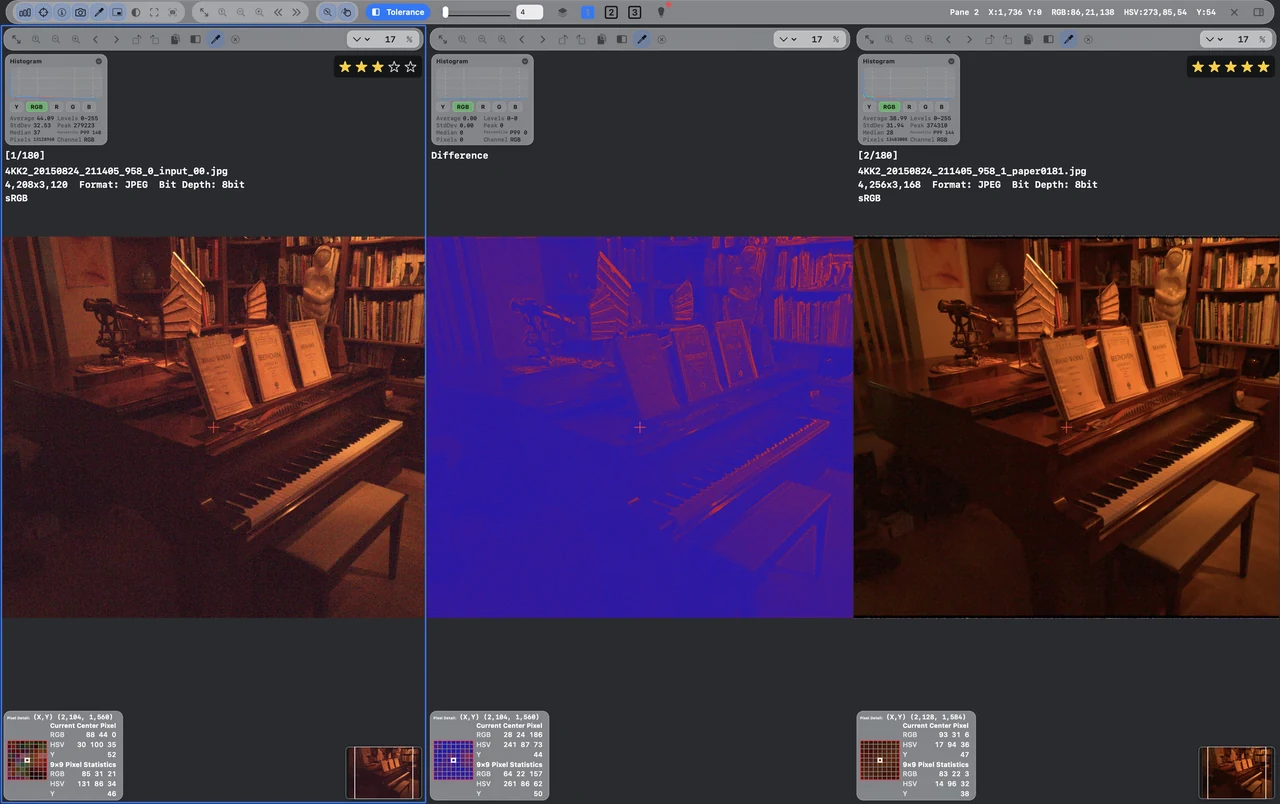
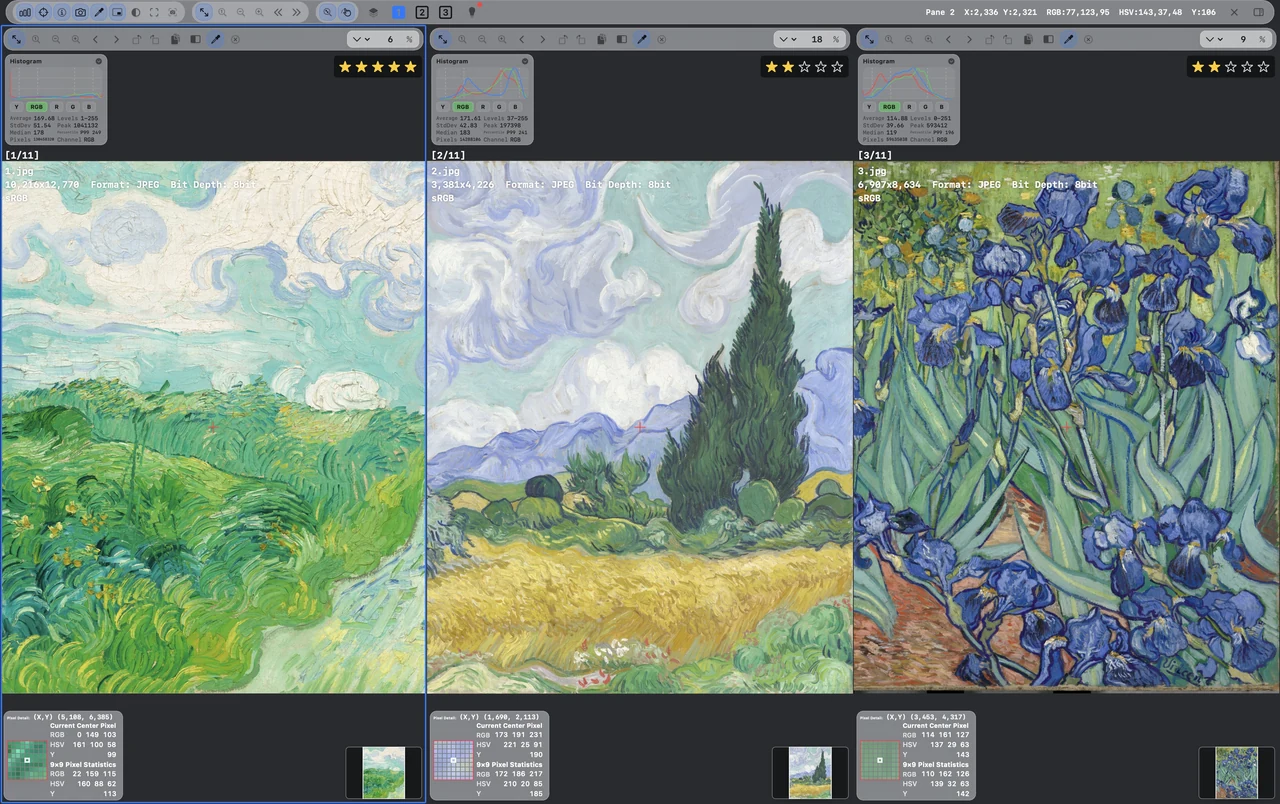
Keep originals beside a difference map. Adjust tolerance to examine changes between two images.原图与差异图并排呈现,调整容差阈值,检查两张图之间的细节变化。元画像と差分マップを並べ、しきい値を調整して変化を確認できます。Muestra los originales junto al mapa de diferencias y ajusta la tolerancia para examinar los cambios.

Differences, made visible.
03 / 03

Every pixel.
In clear detail.
每个像素,都值得看清。ピクセルまで、くっきりと。Cada píxel.
Con todo detalle.

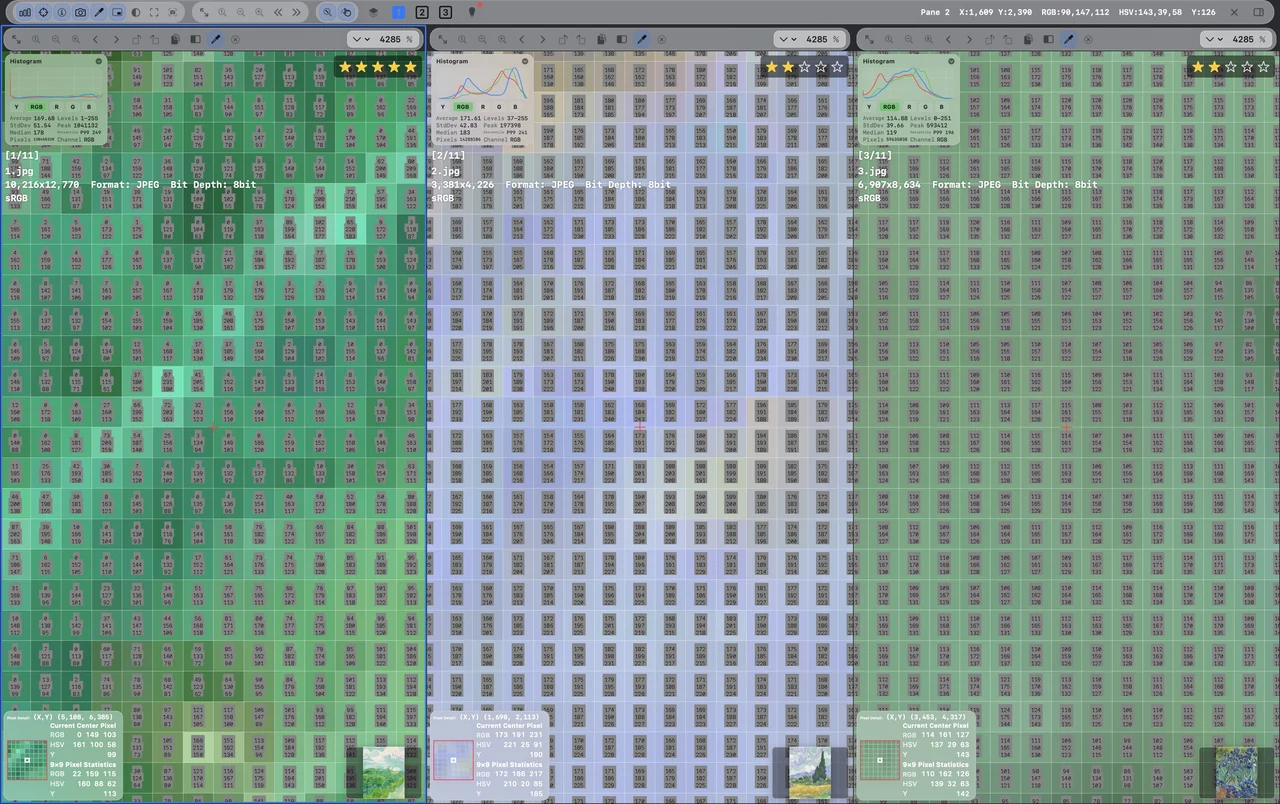
At high zoom, examine the pixel grid and color values. See where each fine difference comes from.高倍率下显示像素网格与颜色数值,观察边缘、纹理和处理痕迹,追踪细微差异。高倍率でピクセルグリッドと色の数値を表示。輪郭や質感の細かな違いを確認できます。Amplía para ver la cuadrícula y los valores de color de cada píxel y localizar diferencias sutiles.

Down to the individual pixel.

Keep scrolling to explore继续滚动,逐一看清スクロールで順番に見るSigue desplazándote para explorar ↓

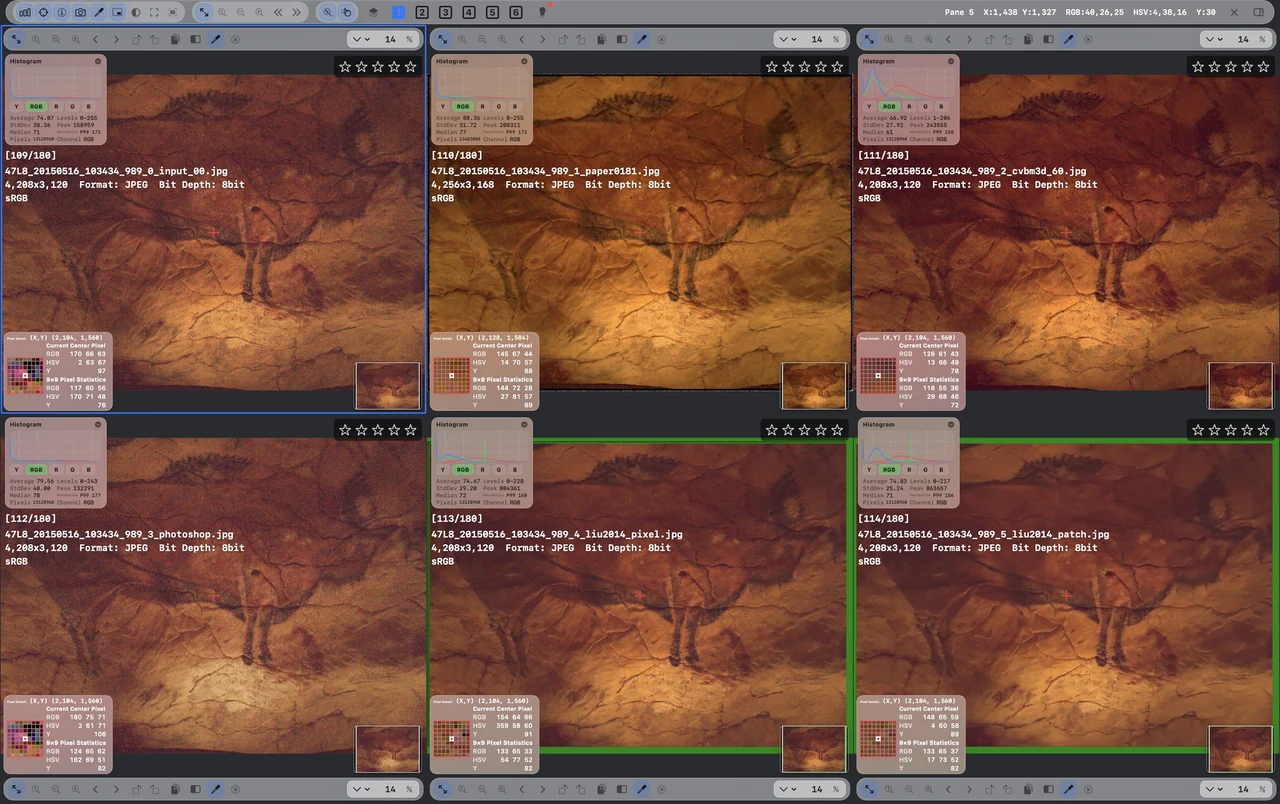
REGIONAL STATISTICS / ROI局部区域统计 / ROI領域統計 / ROIESTADÍSTICAS DE REGIÓN / ROI

The same region.
A precise comparison.
同一处局部。
比较,更有依据。
同じ領域を。
数値で、比べる。
La misma región.
Una comparación precisa.

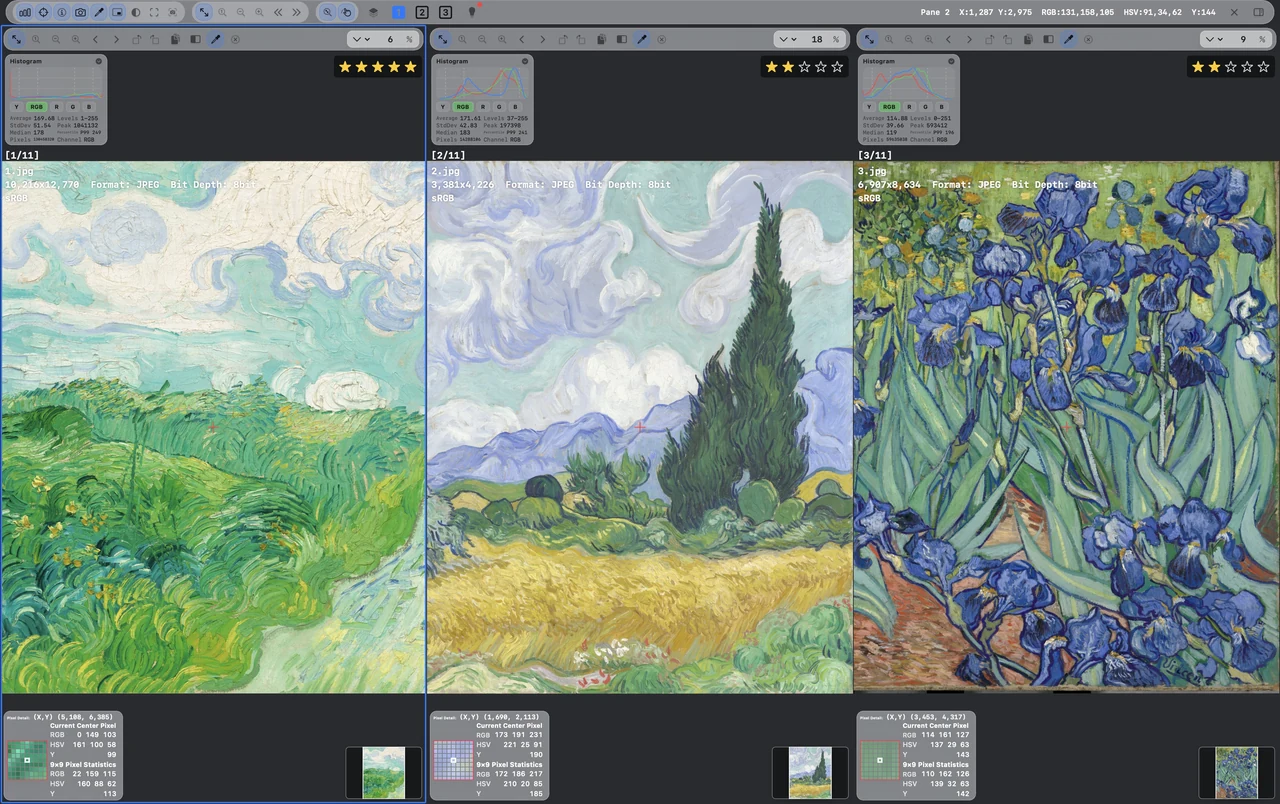
Select a corresponding region across images and compare its average RGB, HSV and luminance Y values. The region preview and image histogram add context to your color and brightness decisions.框选多图中的对应区域,比较区域平均 RGB、HSV 与亮度 Y 数值。结合选区预览和图像直方图,让局部色彩、明暗与版本差异的判断更有依据。複数画像の対応する領域を選び、平均 RGB、HSV、輝度 Y を比較。領域プレビューと画像のヒストグラムを合わせて、色や明るさの違いを確認できます。Selecciona una región correspondiente en varias imágenes y compara sus valores medios RGB, HSV y luminancia Y. La vista de la región y el histograma de la imagen aportan contexto al color y al brillo.

Regional statistics with RGB, HSV and Y values in the English interfaceExplore regional statistics查看局部区域统计详情領域統計を見るExplorar estadísticas de región
01

Select corresponding regions框选对应区域対応する領域を選ぶSelecciona regiones correspondientes

Focus each image on the area you want to compare, with an on-image selection and region preview.在多图中聚焦需要比较的局部,通过画面选框和区域预览,确认观察位置。選択枠と領域プレビューで、各画像の比較したい位置を確認。Centra cada imagen en el área a comparar con la selección y su vista previa.

02

Read RGB · HSV · Y读取 RGB · HSV · YRGB・HSV・Y を確認Consulta RGB · HSV · Y

Compare regional average color and luminance values across images, alongside what your eyes see.比较选区平均颜色与亮度数值,让色偏、明暗的判断有直观数据参考。領域の平均色と輝度を画像間で比べ、見た目の判断を数値で補う。Compara el color medio y la luminancia de la región para apoyar la inspección visual.

03

Connect detail and context局部与整体,结合判断細部と全体をつなぐCombina detalle y contexto

Keep the regional preview and image histogram in view to understand detail within the whole image.结合区域预览与图像直方图,同时理解局部细节和整张图片的分布。領域プレビューと画像のヒストグラムで、細部を全体の中で捉える。La vista de la región y el histograma ayudan a situar el detalle en toda la imagen.

LOOK. MEASURE. DECIDE.观察、量化,再判断。見て、測って、判断する。OBSERVA. MIDE. DECIDE.

Compare the same detail across up to six images. Measure the difference with pixel and region statistics. Carry the decision into blind ranking and reports.让 最多六张图,聚焦同一处细节。用 像素与区域统计,为差异找到依据。再把判断,带入 匿名排序与评审报告。最大6枚の画像で、同じ細部を見る。 ピクセル・領域統計で、違いを確かめる。 匿名順位付けとレポートへ、判断をつなぐ。Compara el mismo detalle en hasta seis imágenes. Mide las diferencias con píxeles y estadísticas regionales. Decide con ranking ciego e informes.

6synchronized views同步视图同期ビューvistas sincronizadas
RGB · HSV · Yregional color & luminance区域色彩与亮度領域の色と輝度color y luminancia regional
Rank → Reportfrom judgment to a record从判断,到可分享的记录判断を、共有できる記録にde la decisión al registro

YOUR VIEW, YOUR WAY按你的方式,排布视野。見たい形で、並べる。TU VISTA, A TU MANERA

More candidates.
One clear view.
更多候选。
一样清晰。
候補を増やしても。
見やすく、ひとつに。
Más candidatos.
Una vista clara.

02 / COLOR GRADING & IMAGE TOOLS调色与图像工具カラー調整と画像ツールCOLOR Y HERRAMIENTAS

From a closer look.
To your own look.
从看清画面。
到调出自己的色彩。
よく見る、その先へ。
自分らしい色を。
De mirar al detalle.
A crear tu estilo.

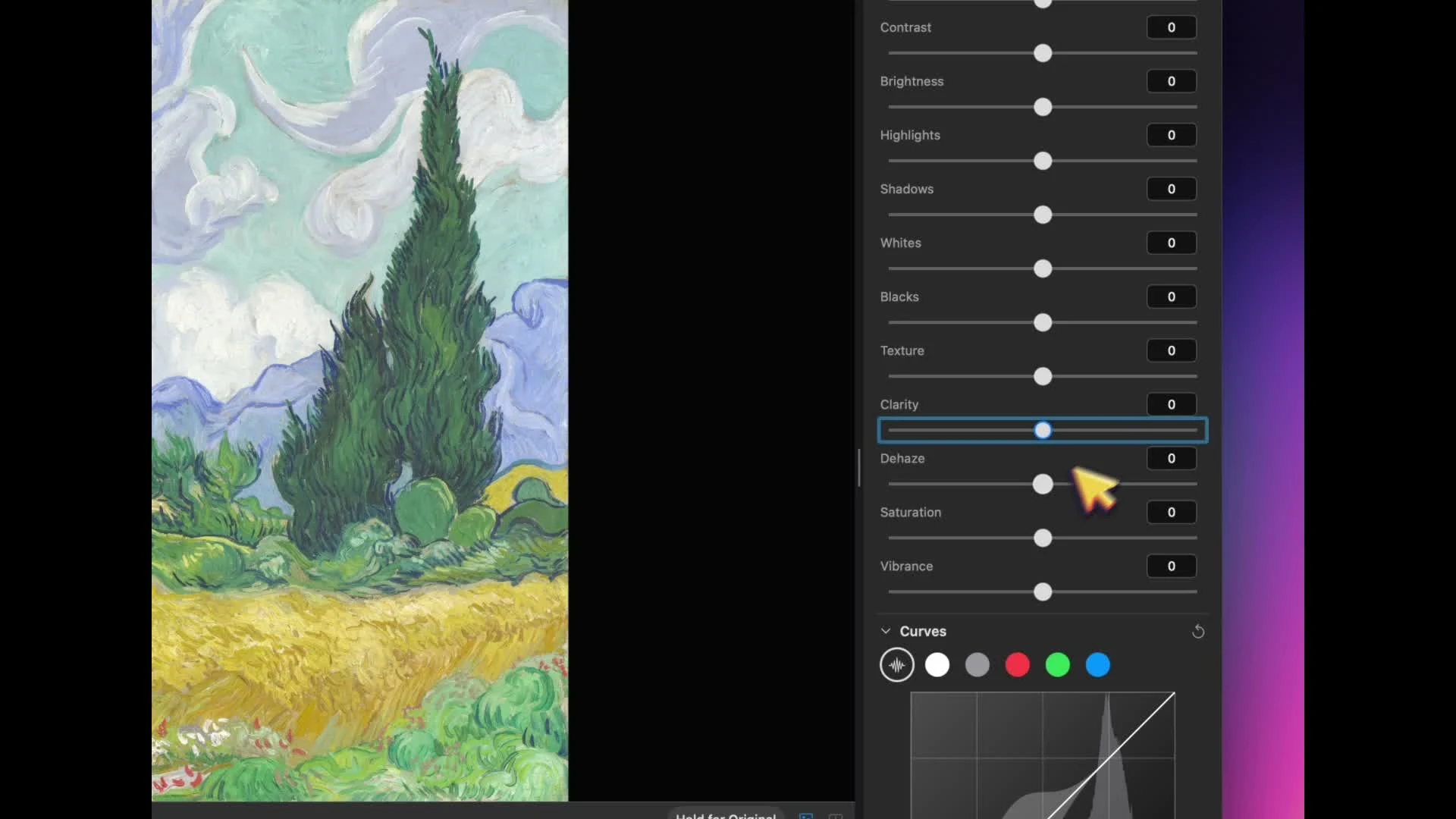
Light, color and shape. A rich workbench, with the original always close at hand.明暗、色彩与形态,丰富工具在手。随时查看原图,在观察中调整,在调整中创作。光、色、形を整える充実のツール。元画像を確認しながら仕上げられます。Luz, color y forma. Un espacio completo, con el original siempre a mano.

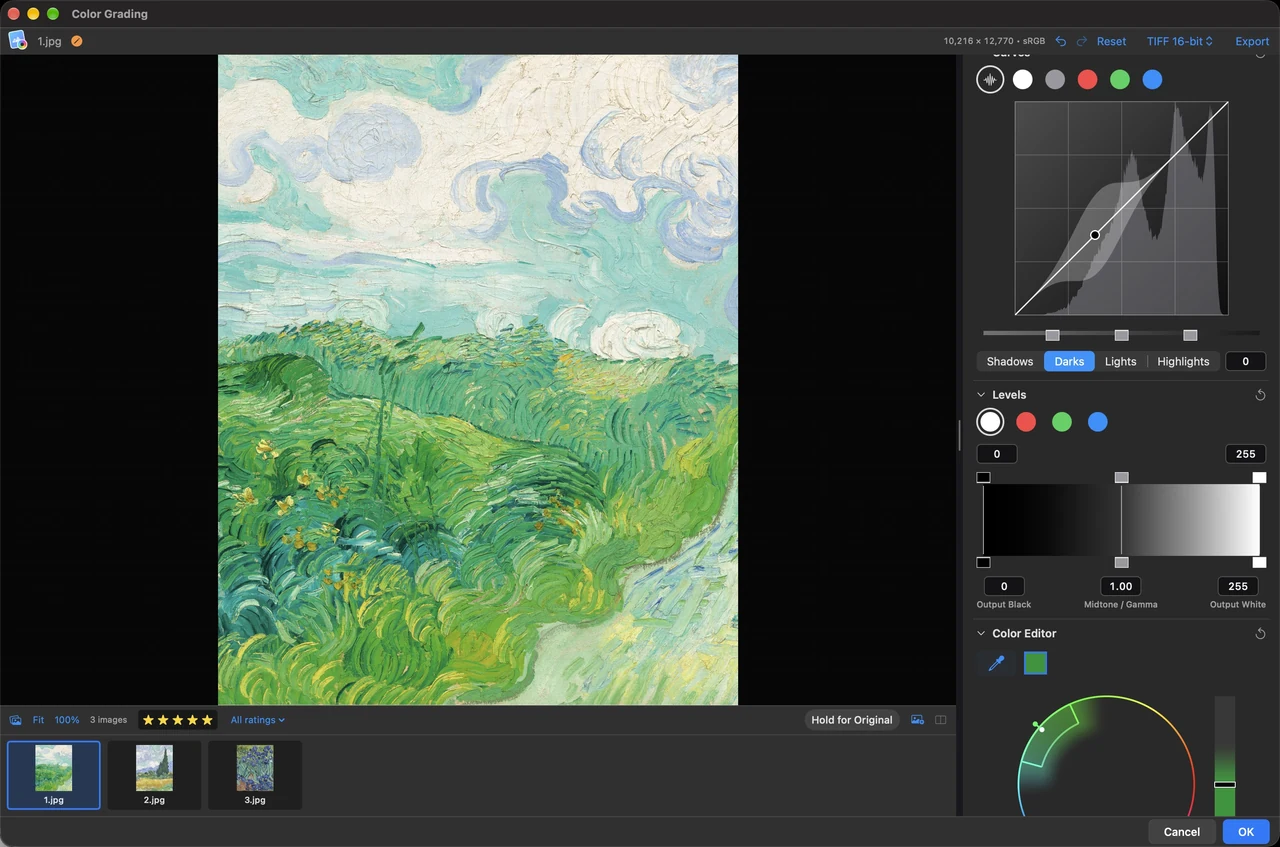
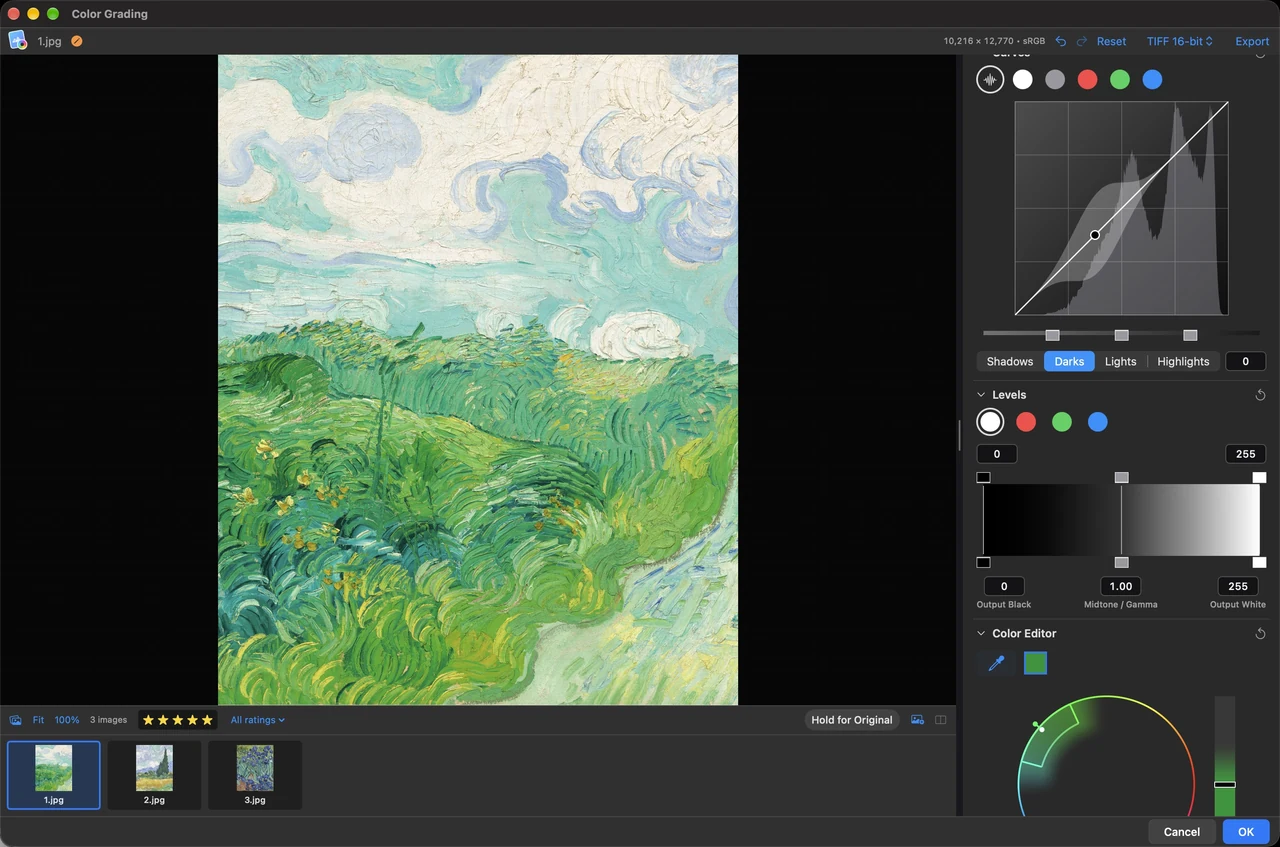
Color grading console with curves, levels and a visual color editorCurves · Levels · Color Editor · HSL · Liquify曲线 · 色阶 · 色彩编辑器 · HSL · 液化カーブ · レベル · カラーエディタ · HSL · ゆがみCurvas · Niveles · Editor de color · HSL · Licuar

Put these tools to work on your own images.用你自己的图片,试试这套工具。自分の画像で、このツールを体験。Prueba estas herramientas con tus imágenes. Explore trial & lifetime access了解两周试用与终生买断無料体験と買い切りを見るVer prueba y compra única →

COLOR GRADING调色工具台カラー調整COLOR

Shape the light with curves.用曲线,塑造明暗层次。カーブで、光を整える。Da forma a la luz con curvas.

Edit curves with histogram feedback and tonal ranges. Follow the direction of each adjustment as you work.结合直方图与明暗分区调整曲线,观察变化方向,更直观地控制画面的明暗层次。ヒストグラムと明暗域を見ながらカーブを調整。変化の方向を確認できます。Edita curvas con histogramas y rangos tonales para seguir cada ajuste de luz.

Shape the light with curves.
Explore feature查看功能详情機能を見るExplorar función

COLOR GRADING调色工具台カラー調整COLOR

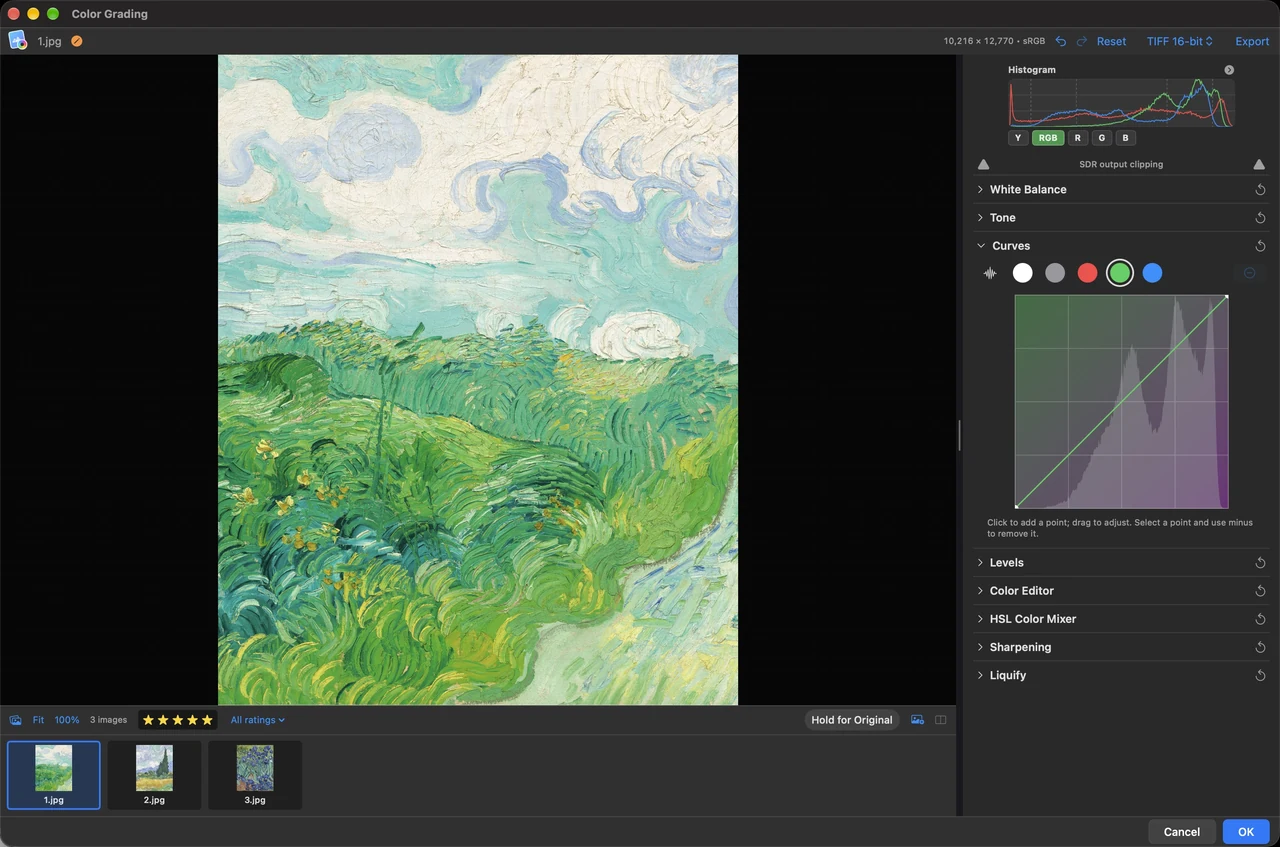
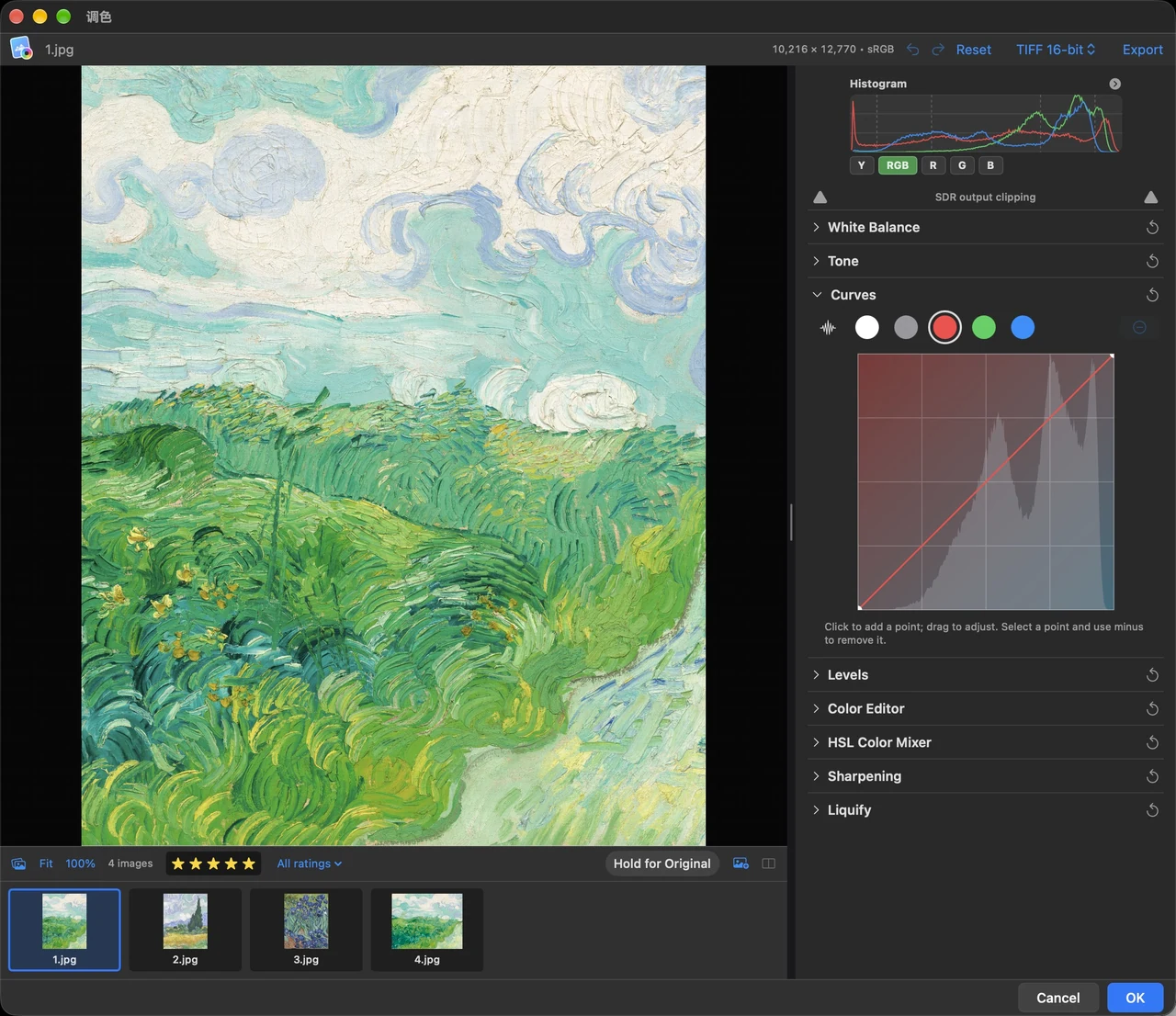
Color channels, finely tuned.逐通道调整,色彩更精细。色チャンネルを、細かく調整。Canales de color, al detalle.

Adjust individual RGB channel curves and inspect their histograms to refine the image color.分别调整 RGB 通道曲线,结合对应直方图,精细控制画面色彩。RGB チャンネルごとのカーブとヒストグラムで、色を細かく整えられます。Ajusta las curvas de cada canal RGB con sus histogramas para afinar el color.

Color channels, finely tuned.
Explore feature查看功能详情機能を見るExplorar función

COLOR GRADING调色工具台カラー調整COLOR

Tone, with room for detail.明暗细节,调得恰到好处。明暗の細部まで、整える。Tono con espacio para el detalle.

Work with white balance, tone, curves and levels. Check the original and prepare a 16-bit TIFF export.白平衡、色调、曲线与色阶相互配合,随时查看原图,支持 16-bit TIFF 导出。ホワイトバランス、トーン、カーブ、レベルを組み合わせ、元画像の確認や 16-bit TIFF 出力も可能です。Combina balance de blancos, tono, curvas y niveles, consulta el original y exporta TIFF de 16 bits.

Tone, with room for detail.
Explore feature查看功能详情機能を見るExplorar función

COLOR GRADING调色工具台カラー調整COLOR

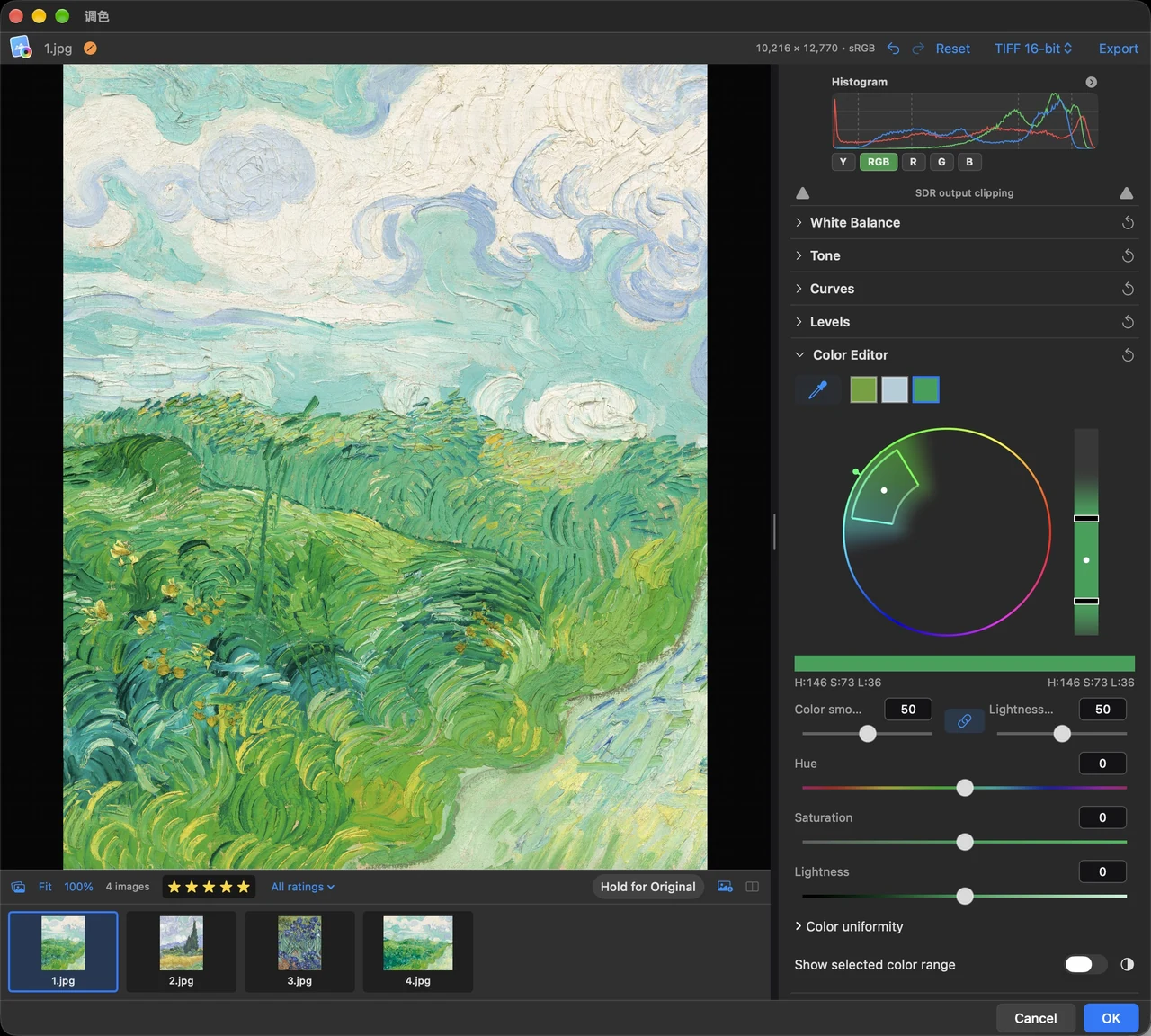
The right color, in the right place.选中色彩,定向调整。狙った色を、狙った場所で。El color preciso, donde lo necesitas.

Pick a color range in the Color Editor and refine its hue, saturation and lightness with the HSL mixer.通过色彩编辑器选取颜色范围,结合 HSL 调色,定向控制色相、饱和度与明度。カラーエディタで色域を選び、HSL で色相・彩度・明度を調整できます。Selecciona un rango con el editor de color y ajusta tono, saturación y luminosidad con HSL.

The right color, in the right place.
Explore feature查看功能详情機能を見るExplorar función

COLOR GRADING调色工具台カラー調整COLOR

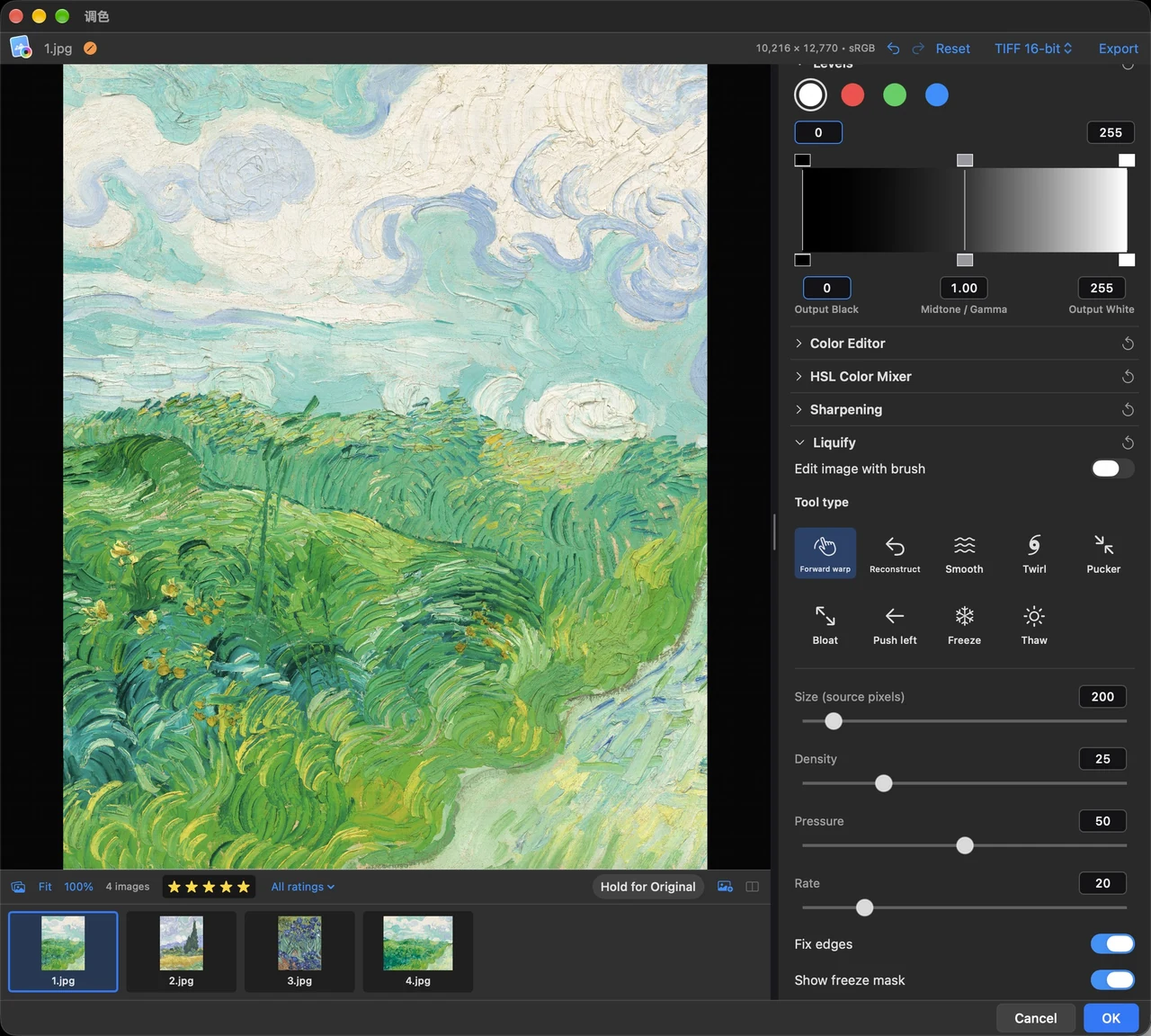
Liquify. A touch of control.液化工具,细节随心塑造。ゆがみを、自在にコントロール。Licuar, con control.

Push, smooth, twirl, pucker or bloat with the liquify brush. Freeze regions to protect the areas you want to keep.向前变形、平滑、旋转、褶皱与膨胀,多种液化笔刷灵活调整;冻结区域,保护不想改变的部分。押す、滑らかにする、回転、収縮、膨張などのブラシを使い、固定領域を保護できます。Deforma, suaviza, gira, contrae o expande con el pincel. Congela regiones para protegerlas.

Liquify. A touch of control.
Explore feature查看功能详情機能を見るExplorar función

SEE THE TOOLS IN MOTION让操作,自己说话。操作を、映像で。LAS HERRAMIENTAS EN ACCIÓN

Twenty seconds.
A different perspective.
20 秒。
看见调整的过程。
20 秒で。
調整の流れを体験。
Veinte segundos.
Otra perspectiva.

Watch a real color grading session, from tonal adjustments to curves.跟随真实调色操作,从明暗调整到曲线控制,看见画面一步步变化。明暗調整からカーブまで、実際のカラー調整をご覧ください。Observa una sesión real de color, desde los ajustes tonales hasta las curvas.

Muted preview · 20 seconds静音预览 · 20 秒ミュートプレビュー · 20 秒Vista previa sin sonido · 20 segundosOpen the full demonstration观看完整演示デモを大きく見るAbrir la demo completa ↗

A BRIGHTER PERSPECTIVE高光之上,还有细节。ハイライトの、その先へ。OTRA DIMENSIÓN DE LUZ

The real workspace.
The real highlights.
真实工作台。
真实 HDR 高光。
実際の画面で。
本来のハイライトを。
El espacio real.
La luz real.

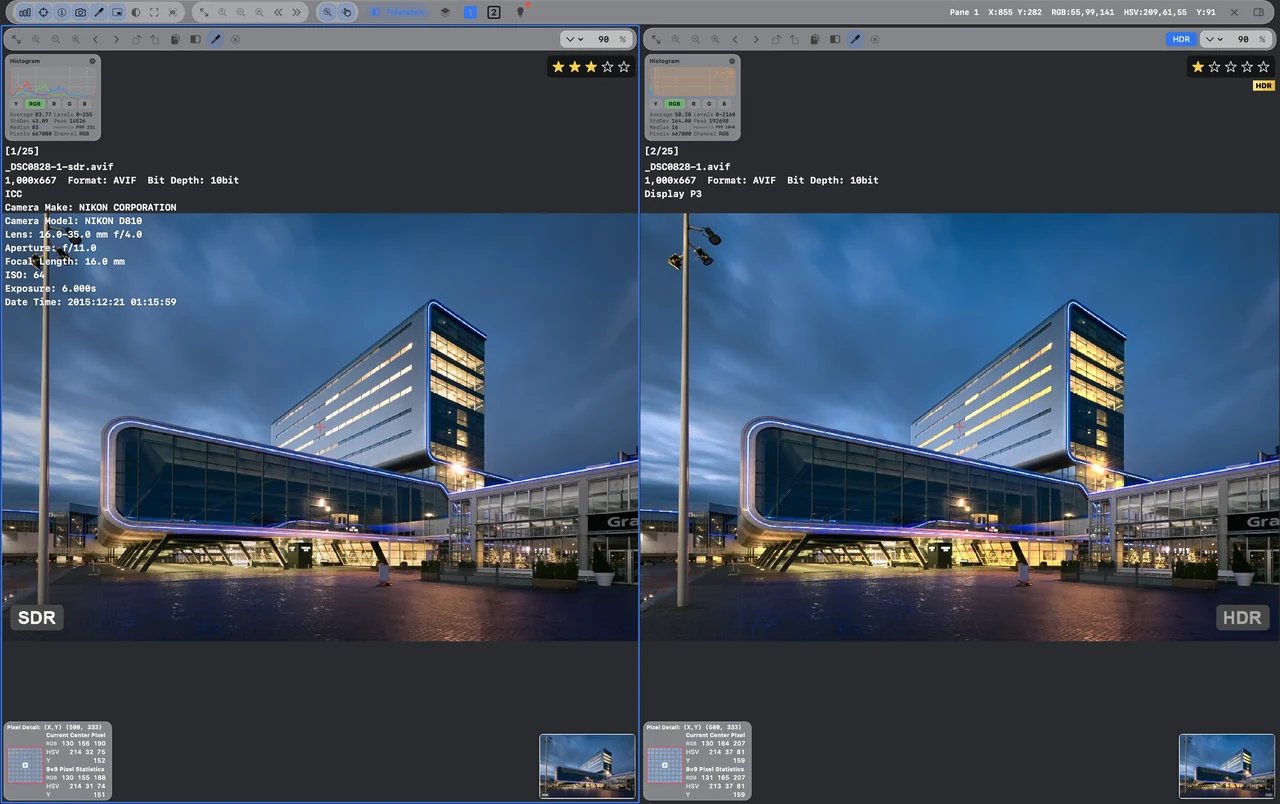
SDR on the left. The original HDR image on the right. See both, inside the app interface.左侧 SDR,右侧原始 HDR。保留真实应用界面,直接观察图像的高光层次。左に SDR、右にオリジナルの HDR。アプリ画面の中で、両方を確認できます。SDR a la izquierda, HDR original a la derecha. Observa ambos dentro de la interfaz.

HDR, inside your workspace.
Original SDR AVIF photograph
Original HDR AVIF photograph
SDR / HDR

To see the full HDR highlight range, use a compatible HDR display and browser. On SDR displays, differences may be limited.完整 HDR 高光表现需要支持 HDR 的屏幕与浏览器;在 SDR 屏幕上,显示差异可能有限。HDR の明るさをすべて見るには、対応画面とブラウザが必要です。SDR 画面では違いが小さい場合があります。Para ver todo el rango HDR, usa una pantalla y navegador compatibles. En pantallas SDR, la diferencia puede ser limitada.

THE REST OF YOUR WORKFLOW一站式,不止于调色。ワークフローの、続きを。EL RESTO DE TU FLUJO

From selection.
To something worth sharing.
从挑选。
到值得分享的作品。
選ぶところから。
共有できる作品まで。
De seleccionar.
A crear algo que compartir.

Review, rank, compress, stitch and animate. Keep the next step within reach.评审、Rank、压缩、拼图与 GIF。让图像工作流的下一步,始终触手可及。レビュー、順位付け、圧縮、結合、GIF。次の操作も、すぐ手元に。Evalúa, ordena, comprime, une y anima. El siguiente paso, siempre a mano.

IMAGE WORKSPACE图像工作空间画像ワークスペースESPACIO DE IMAGEN

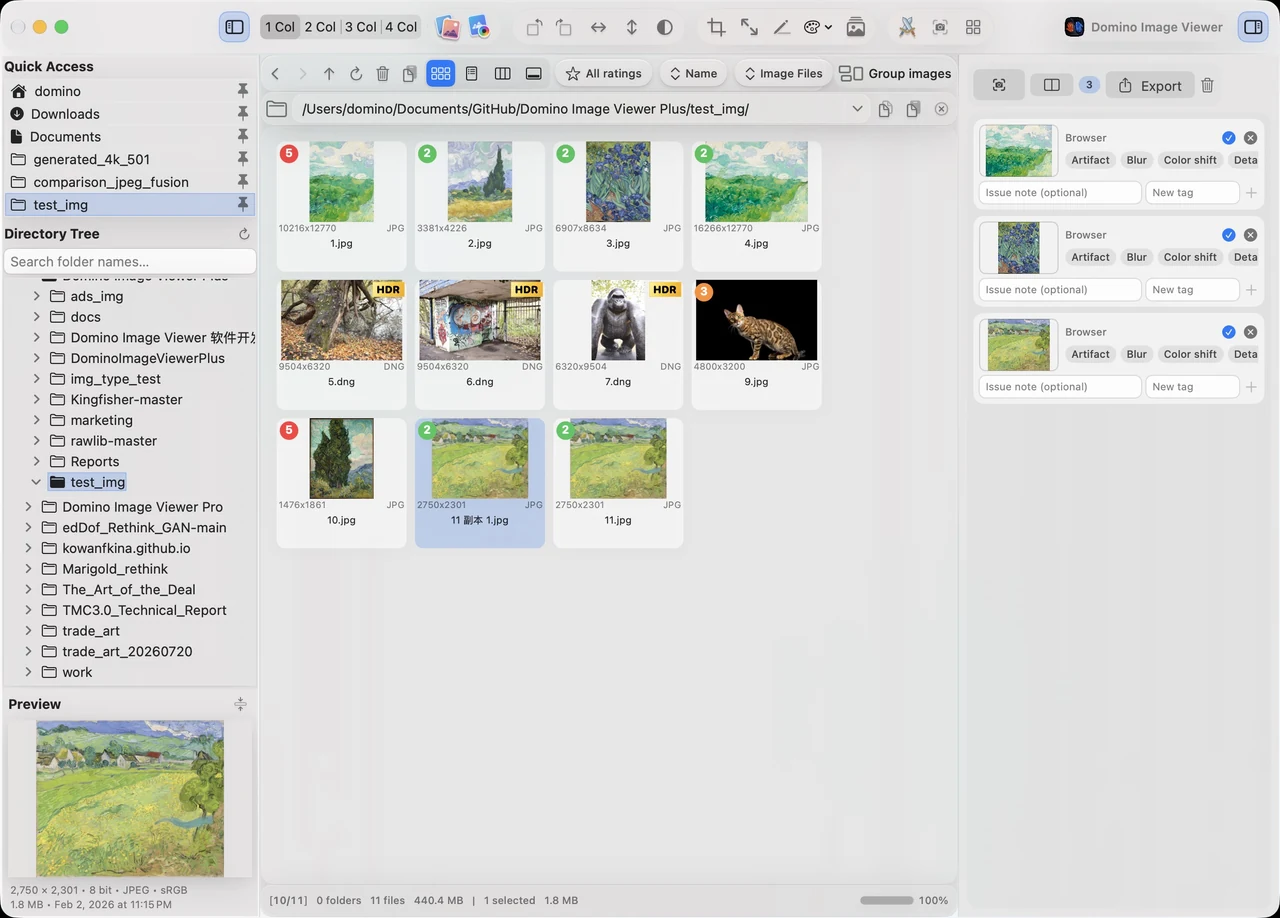
Browse. Select. Keep moving.浏览、评级,顺手整理。閲覧も選別も、スムーズに。Explora, selecciona y continúa.

Browse folders, preview images, add star ratings and gather images in the capture tray before comparing.浏览文件夹、预览图片、设置星级,将图片集中到中转站,直接进入对比。フォルダの閲覧、プレビュー、星評価、トレイへの収集から、そのまま比較へ。Explora carpetas, previsualiza, puntúa con estrellas y reúne imágenes en la bandeja para compararlas.

Browse. Select. Keep moving.
Explore feature查看功能详情機能を見るExplorar función

IMAGE WORKSPACE图像工作空间画像ワークスペースESPACIO DE IMAGEN

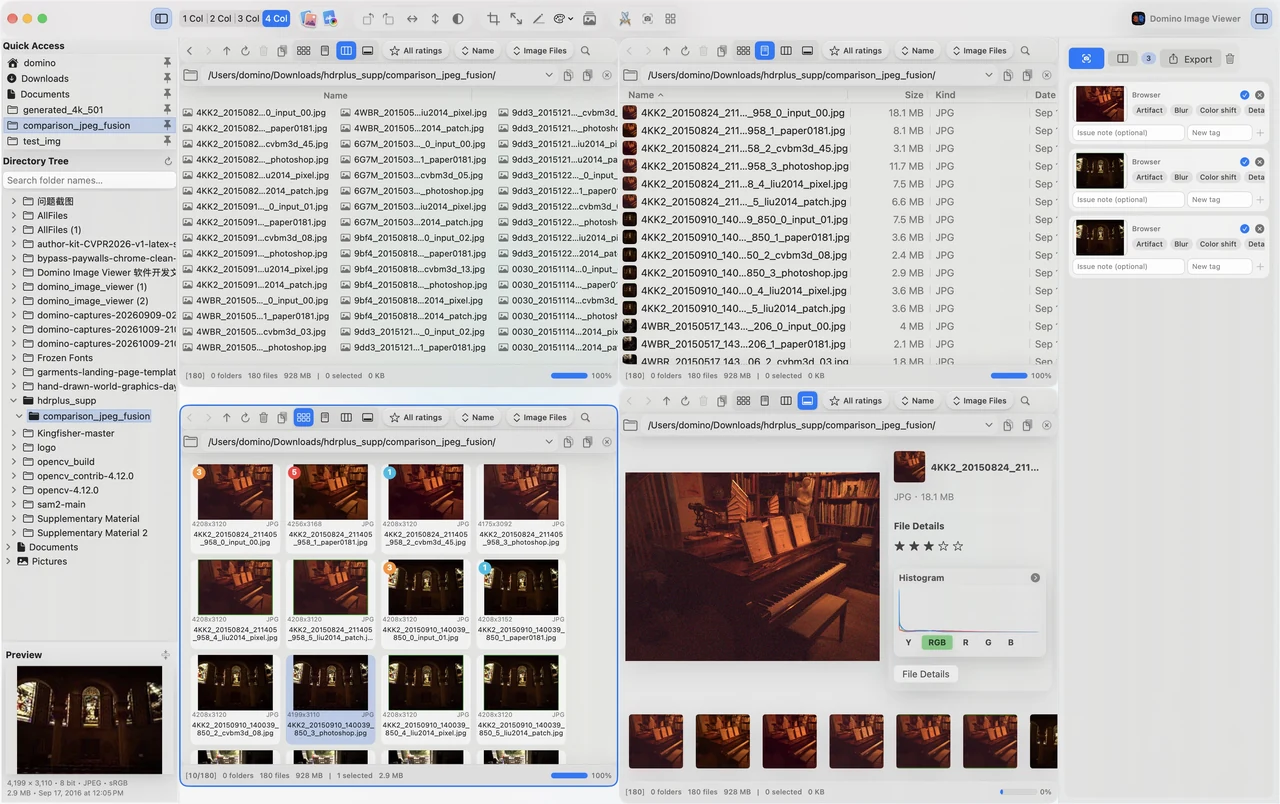
Several folders. One browser.多栏浏览,文件尽在眼前。複数のフォルダを、ひとつに。Varias carpetas. Un navegador.

Use up to four browser columns to work across folders, preview selections and prepare a comparison.最多四栏浏览文件夹,配合缩略图、列表与预览,让查找、整理和对比准备顺畅衔接。最大 4 列でフォルダを閲覧。サムネイル、一覧、プレビューで比較の準備もスムーズです。Explora carpetas en hasta cuatro columnas con miniaturas, listas y vistas previas.

Several folders. One browser.
Explore feature查看功能详情機能を見るExplorar función

IMAGE WORKSPACE图像工作空间画像ワークスペースESPACIO DE IMAGEN

A considered score for every image.每一张,都有专业判断。一枚ずつ、丁寧に評価。Una valoración para cada imagen.

Score candidates while comparing them side by side. A compact review console leaves more room for the images.同屏比较候选图片,逐张评分。紧凑评审台为画面留下更多空间,让判断更专注。候補を並べて見ながら採点。コンパクトな評価パネルで画像を広く確認できます。Puntúa las imágenes mientras las comparas. El panel compacto deja más espacio para observar.

A considered score for every image.
Explore feature查看功能详情機能を見るExplorar función

IMAGE WORKSPACE图像工作空间画像ワークスペースESPACIO DE IMAGEN

Rank the image, not its name.匿名 Rank,让画面说话。名前ではなく、画像を評価。Evalúa la imagen, no su nombre.

Rank anonymous candidates and randomize group or pane order. Reset the current group if you want to start its ranking again.匿名比较候选,随机化组与窗口顺序,减少名称暗示。当前组可重置排位,重新作出判断。匿名の候補とランダムな表示順で評価。現在の組の順位はリセットしてやり直せます。Ordena candidatos anónimos con grupos o paneles aleatorios. Reinicia la clasificación del grupo actual cuando lo necesites.

Rank the image, not its name.
Explore feature查看功能详情機能を見るExplorar función

IMAGE WORKSPACE图像工作空间画像ワークスペースESPACIO DE IMAGEN

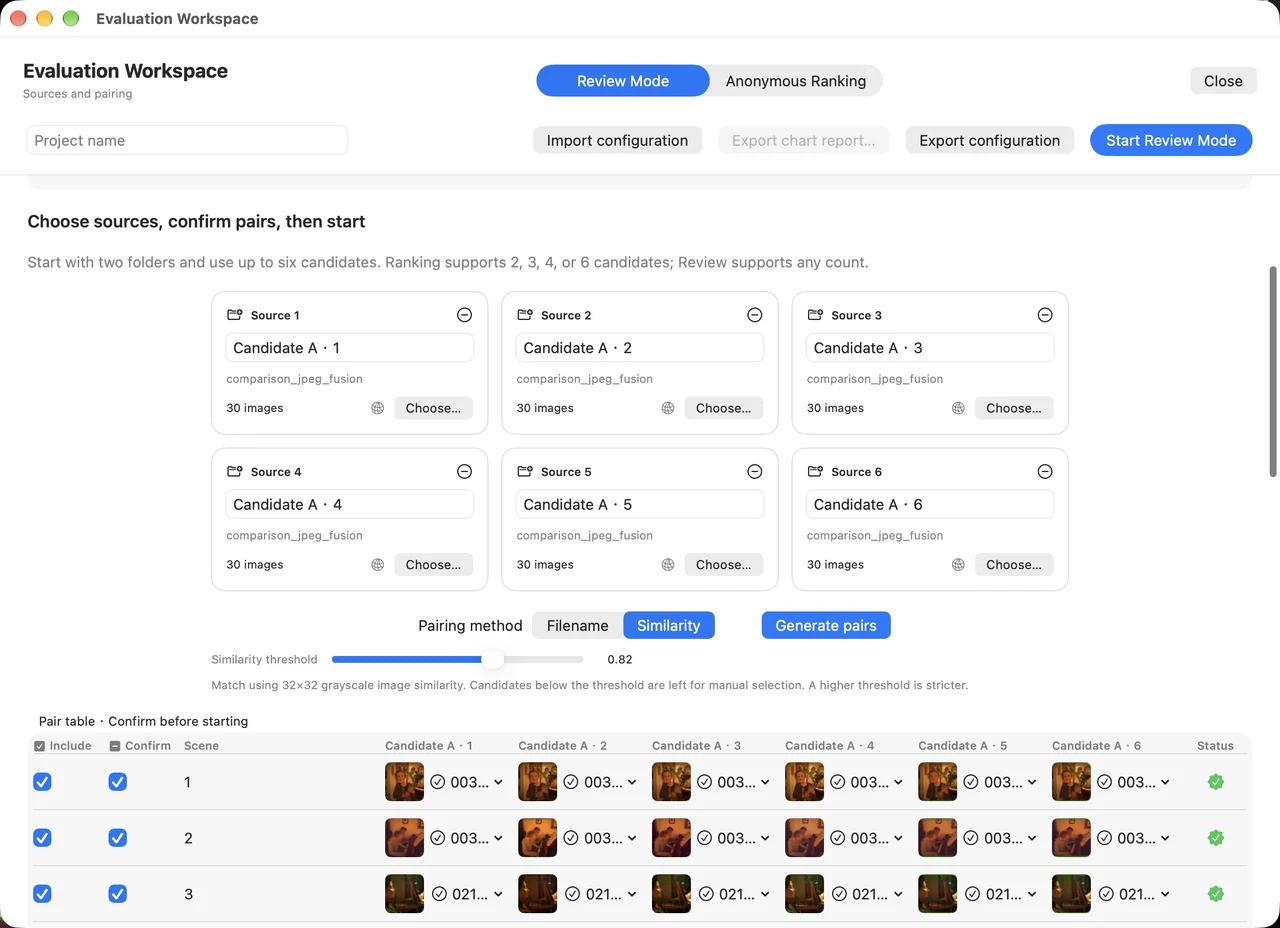
Projects that keep your progress.评审项目,随时接着做。レビューの続きを、いつでも。Proyectos que guardan tu progreso.

Build review or anonymous ranking projects from your image sources. Save, import and export projects for later work.从图片来源创建评审或匿名 Rank 项目。保存进度,导入导出项目,下一次继续判断。画像からレビューや匿名ランキングを作成。進行状況を保存し、プロジェクトを入出力できます。Crea proyectos de evaluación o ranking anónimo, guarda el progreso e importa o exporta para continuar después.

Projects that keep your progress.
Explore feature查看功能详情機能を見るExplorar función

IMAGE WORKSPACE图像工作空间画像ワークスペースESPACIO DE IMAGEN

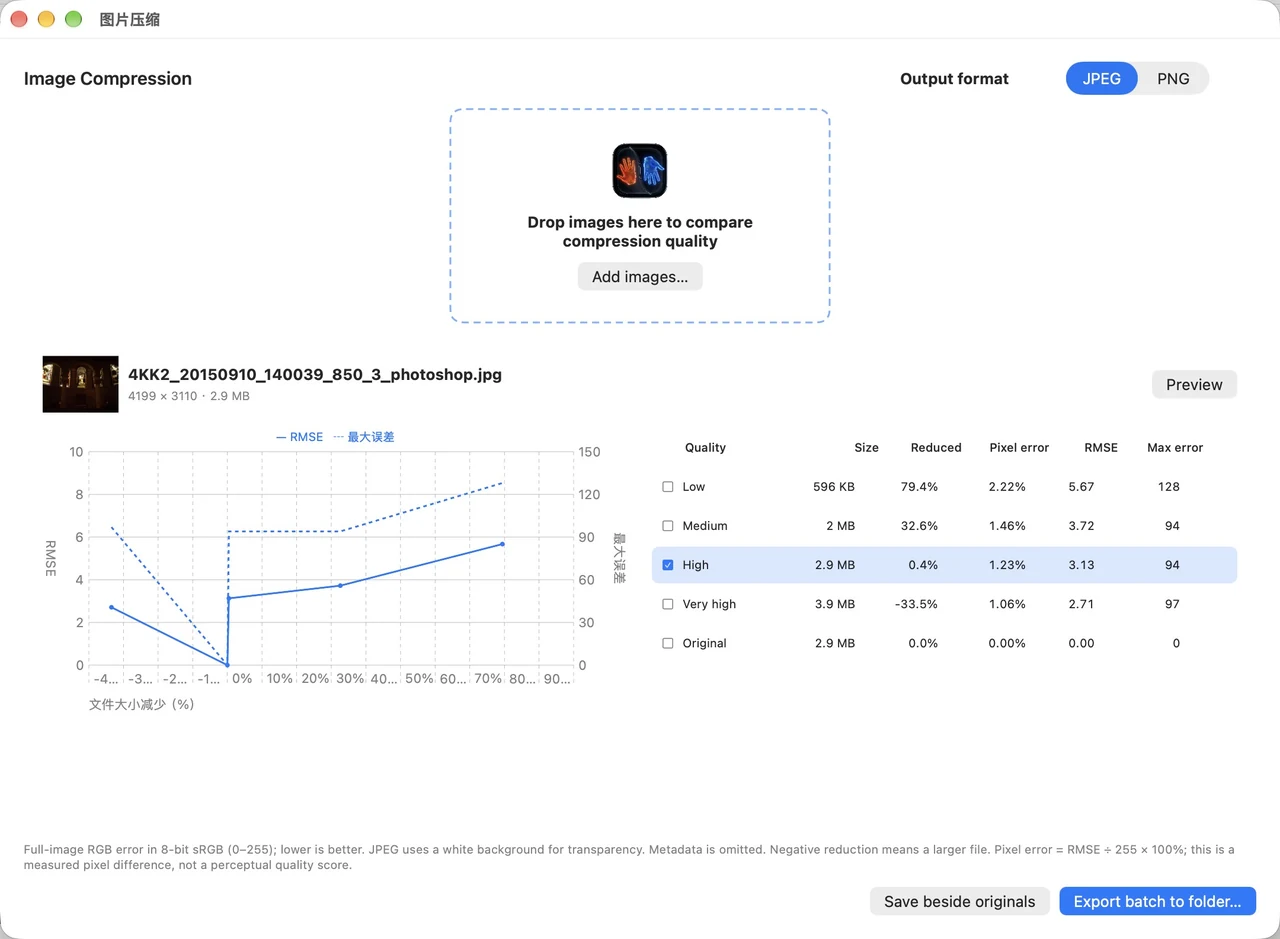
Find the balance. Save the bytes.体积与画质,找到平衡。画質とサイズの、いいバランス。Equilibra calidad y tamaño.

Compare compression quality, file size and RMSE in one workspace. Export JPEG or PNG without switching apps.在一个界面中比较压缩质量、文件体积与 RMSE,直接导出 JPEG 或 PNG。圧縮品質、ファイルサイズ、RMSE を一画面で比較し、JPEG や PNG に書き出せます。Compara calidad, tamaño y RMSE en un espacio y exporta en JPEG o PNG.

Find the balance. Save the bytes.
Explore feature查看功能详情機能を見るExplorar función

IMAGE WORKSPACE图像工作空间画像ワークスペースESPACIO DE IMAGEN

Your comparison, ready to share.把对比,拼成一张图。比較結果を、一枚に。Tu comparación, lista para compartir.

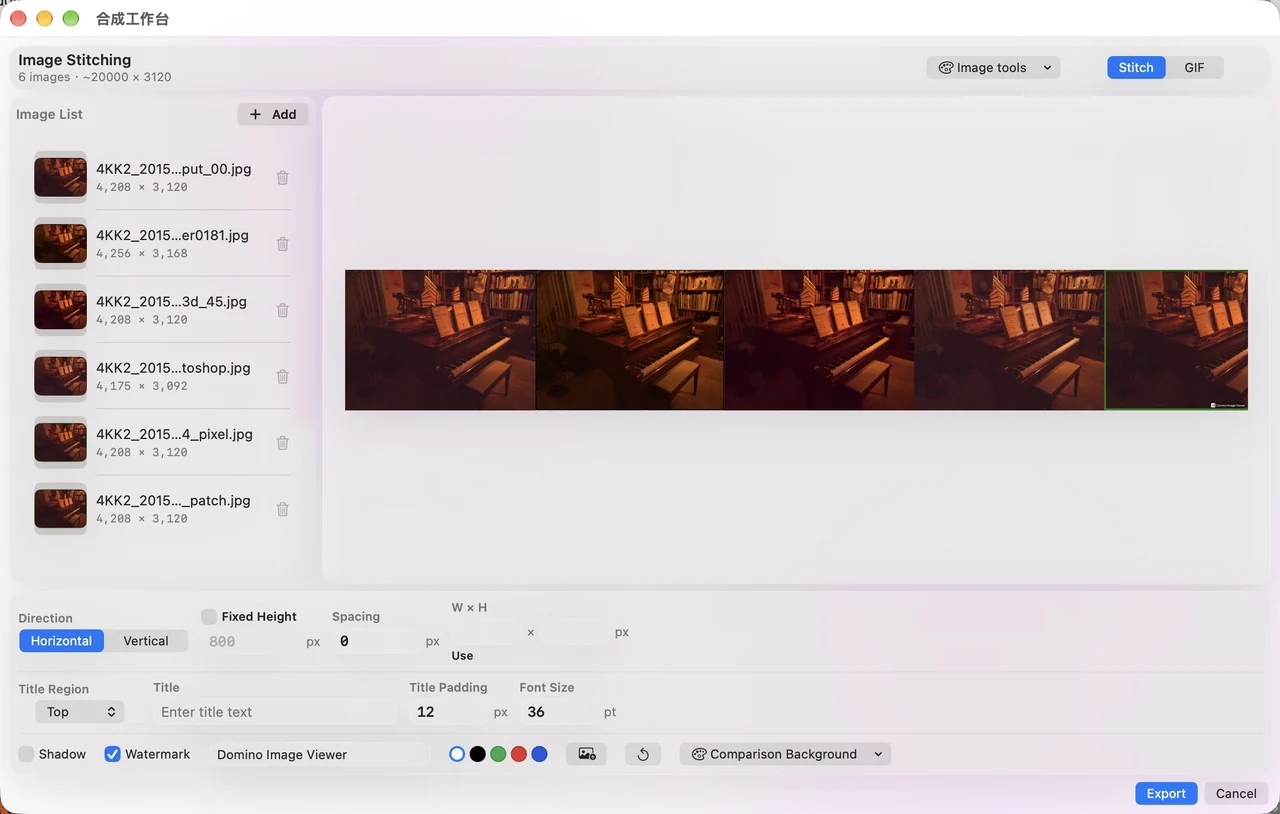
Stitch images horizontally or vertically, set spacing and titles, then export one comparison image.横向或纵向拼接图片,设置间距、标题和水印,导出一张便于分享的对比图。横・縦の結合、余白やタイトルを調整して、共有しやすい比較画像を書き出せます。Une imágenes en horizontal o vertical, ajusta espacios y títulos y exporta una sola imagen.

Your comparison, ready to share.
Explore feature查看功能详情機能を見るExplorar función

IMAGE WORKSPACE图像工作空间画像ワークスペースESPACIO DE IMAGEN

Let the comparison move.让对比,动起来。比較を、動きで伝える。Dale movimiento a la comparación.

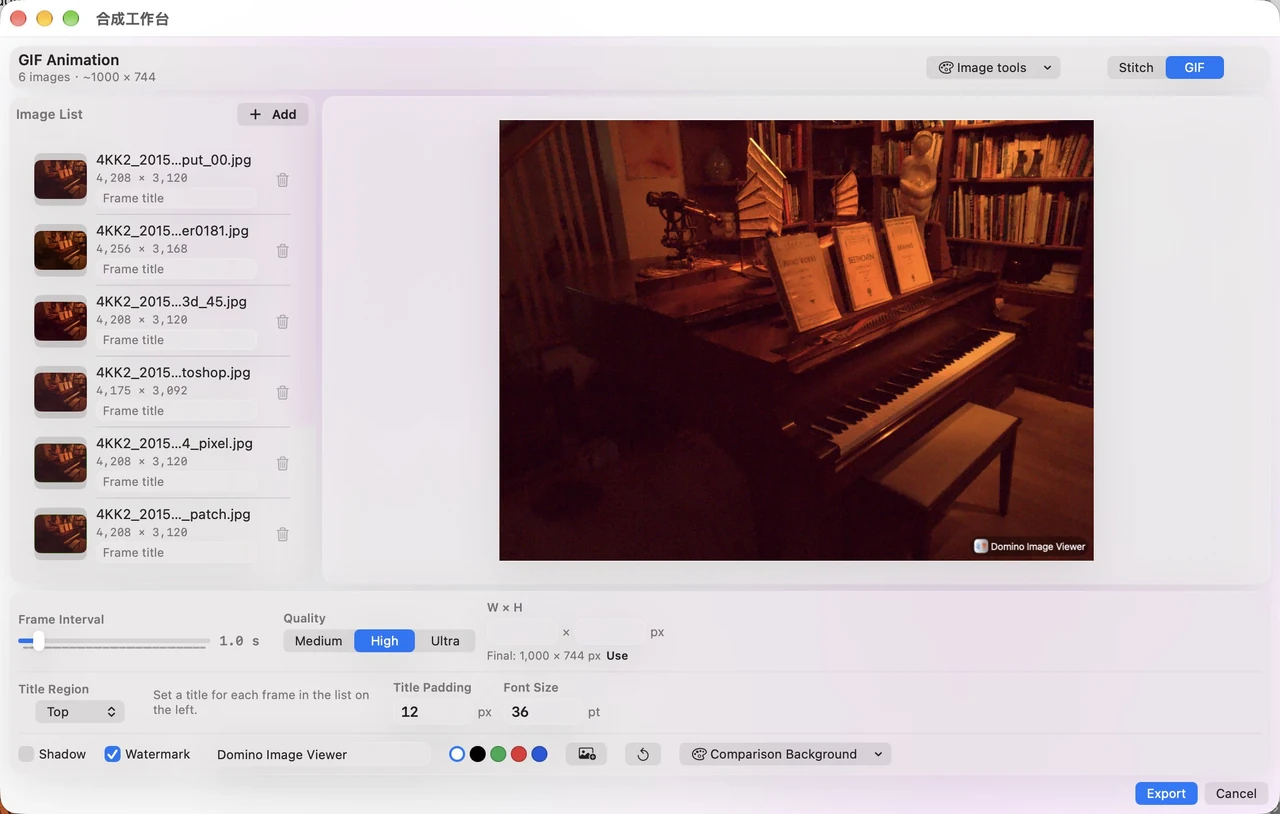
Turn an image sequence into a GIF. Adjust frame timing, output size and labels before exporting.将图片序列制作成 GIF,调整帧时长、输出尺寸与标题,动态展示处理前后或不同版本。画像を GIF に変換。フレーム時間、出力サイズ、ラベルを調整して違いを伝えられます。Convierte una secuencia en GIF, ajusta tiempos, tamaño y etiquetas para mostrar las diferencias.

Let the comparison move.
Explore feature查看功能详情機能を見るExplorar función

IMAGE WORKSPACE图像工作空间画像ワークスペースESPACIO DE IMAGEN

Inspect the region that matters.聚焦局部,让判断有数。必要な領域を、数値で確認。Examina la región que importa.

Inspect a selected region with histograms and image statistics. Compare brightness and color in the same area.结合直方图与图像统计,检查选定区域的亮度、色彩与分布,让细节判断更有依据。選択領域のヒストグラムと統計から、明るさや色の分布を比べられます。Consulta histogramas y estadísticas de una región seleccionada para comparar luz y color.

Inspect the region that matters.
Explore feature查看功能详情機能を見るExplorar función

IMAGE WORKSPACE图像工作空间画像ワークスペースESPACIO DE IMAGEN

HDR, inside your workspace.HDR 与 SDR,自由切换。HDR と SDR を、その場で。HDR y SDR, en tu espacio.

Switch between HDR and SDR in the app to compare highlights, color and shadow detail. A compatible HDR display and browser reveal the full highlight range.在应用中切换 HDR 与 SDR,比较高光、色彩与暗部层次。使用支持 HDR 的屏幕与浏览器,能更完整呈现原始图像的高光。アプリで HDR と SDR を切り替え、ハイライト、色、暗部を比較。対応ディスプレイとブラウザで、本来の明るさを確認できます。Cambia entre HDR y SDR en la app para comparar luz, color y sombras. Una pantalla y navegador HDR compatibles muestran todo el rango de altas luces.

HDR, inside your workspace.
Explore feature查看功能详情機能を見るExplorar función

IMAGE WORKSPACE图像工作空间画像ワークスペースESPACIO DE IMAGEN

Crop and resize, ready at hand.裁剪与缩放,顺手完成。切り抜きとサイズ変更も、手元で。Recorta y redimensiona, al instante.

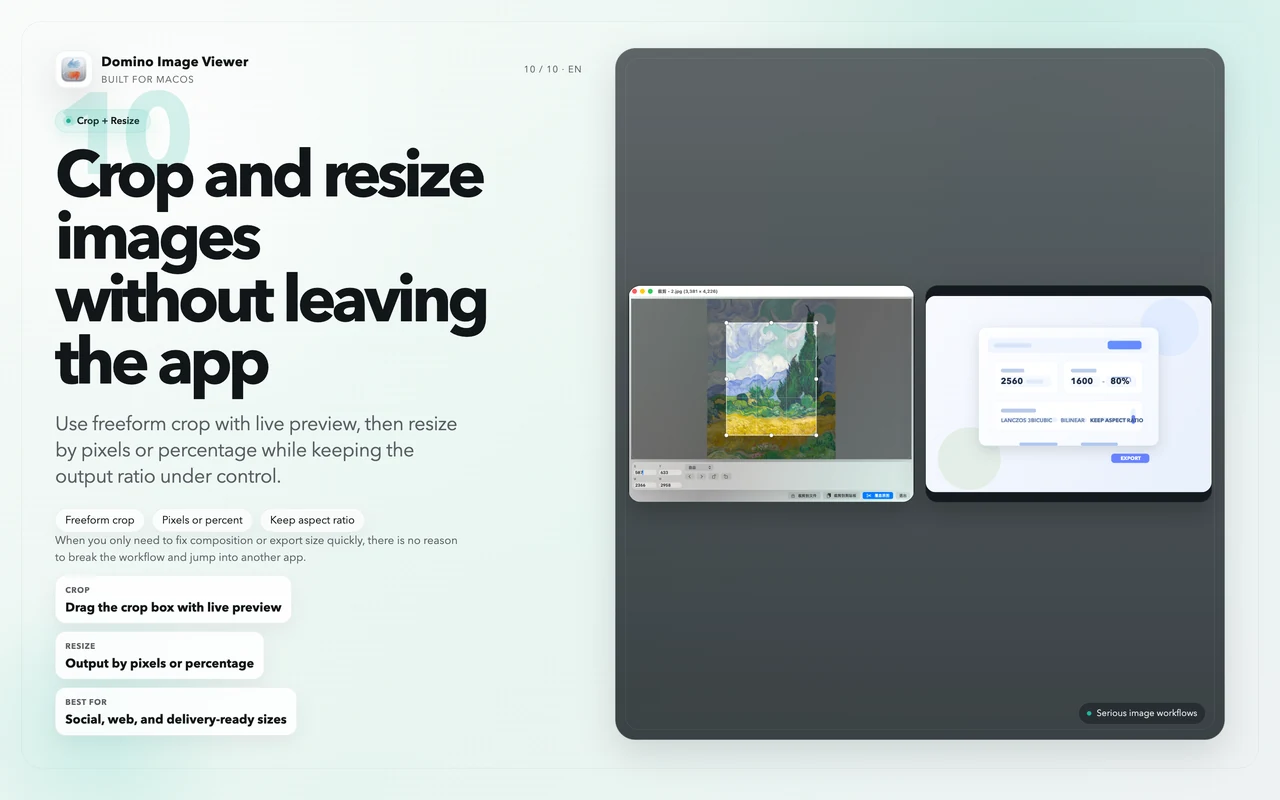
Crop an image and resize its output in the same app. Prepare the dimensions you need before sharing.在应用内完成裁剪与缩放,按所需尺寸准备图片,轻松衔接分享与输出。同じアプリで切り抜きとサイズ変更。共有前に必要なサイズを整えられます。Recorta y cambia el tamaño en la misma app para preparar tus imágenes antes de compartir.

Crop and resize, ready at hand.
Explore feature查看功能详情機能を見るExplorar función

IMAGE WORKSPACE图像工作空间画像ワークスペースESPACIO DE IMAGEN

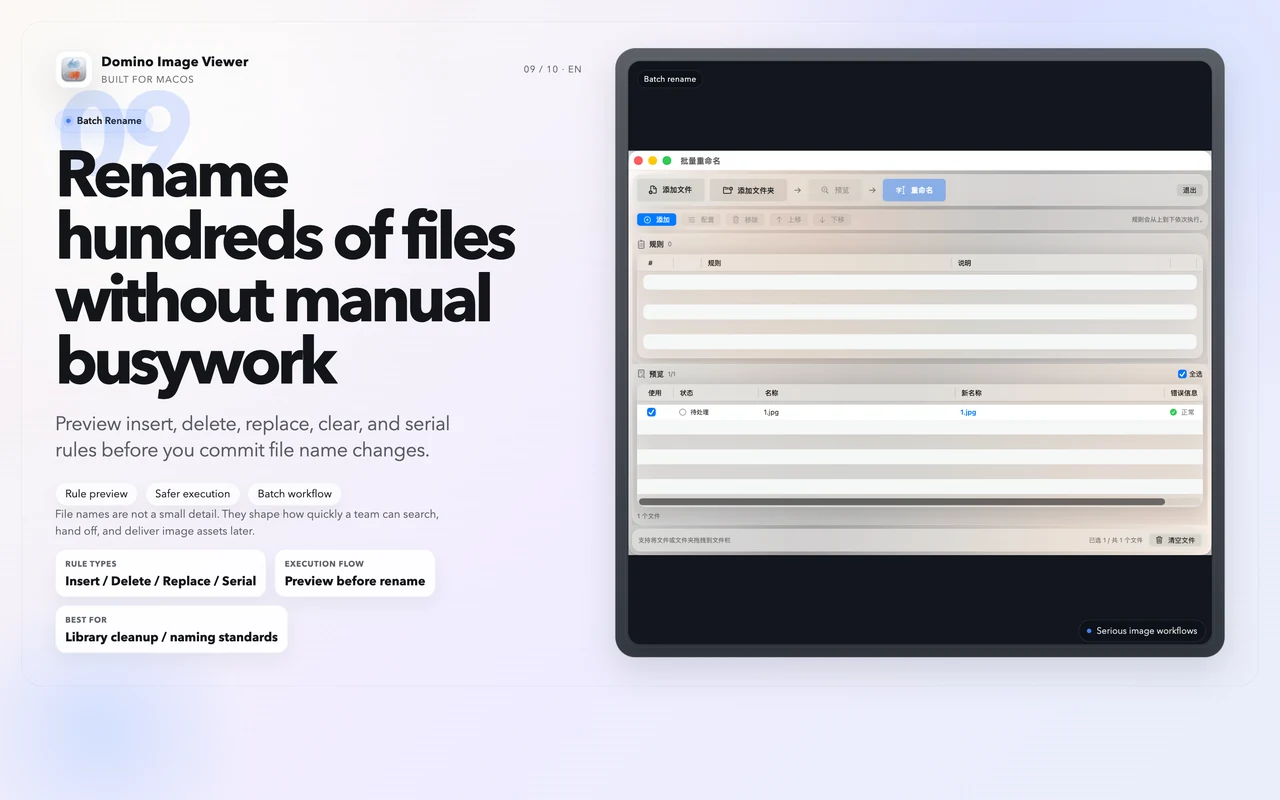
Bring order to your image names.批量重命名,整理更省心。画像の名前も、まとめて整理。Pon orden en los nombres.

Rename a selection with consistent rules. Keep a large image folder easier to browse and organize.为选中的图片按统一规则批量重命名,让大量图片的查找与整理更顺手。選択画像を統一ルールで一括名前変更。大量の画像も整理しやすくなります。Renombra una selección con reglas coherentes y organiza carpetas con muchas imágenes.

Bring order to your image names.
Explore feature查看功能详情機能を見るExplorar función

Also at hand: crop, resize, rotate, batch rename and star ratings.还有:裁剪、缩放、旋转、批量重命名与星级评级。さらに、切り抜き、サイズ変更、回転、一括名前変更、星評価も。También: recortar, redimensionar, girar, renombrar por lotes y puntuar.

IN SYNC. IN MOTION.同步,才更从容。同期して、スムーズに。EN SINCRONÍA. EN MOVIMIENTO.

Stay on the same detail.始终聚焦同一处细节。同じ細部を、見続ける。Mantén el mismo detalle.

Zoom and pan together. Spend your time comparing, not finding your place.同步缩放与平移,把时间留给观察,不必反复定位。同期ズーム・パンで、位置探しではなく比較に集中。Zoom y desplazamiento juntos: dedica el tiempo a comparar.

CHOOSE YOUR WORKFLOW选工具,也是在选工作流。自分の作業に合うツールを。ELIGE TU FLUJO DE TRABAJO

Comparison is only the start.
Make every decision count.
对比,不止并排。
让判断,有据可依。
並べて見る、その先へ。
根拠ある判断へ。
Comparar es el principio.
Decide con fundamento.

Six synchronized views. Pixel and region statistics. Blind ranking and reports. A connected image workflow, built for Mac.六图同步、像素与区域统计、匿名排序与报告。在一个 Mac 工作台里,把观察、验证与判断连起来。6枚の同期表示、ピクセル・領域統計、匿名順位付けとレポート。Macでひとつにつながる画像ワークフロー。Seis vistas sincronizadas, estadísticas, ranking ciego e informes. Un flujo conectado, diseñado para Mac.

Mac

Domino Image Viewer

Observe. Measure. Decide.看清、量化,再判断。見て、測って、判断する。Observa. Mide. Decide.

1–6 synchronized views同步视图同期ビューvistas sincronizadas

Difference and overlay, ROI statistics, staging, blind ranking and exportable reports — in one workspace.差异与叠加、区域统计、中转站、匿名 Rank 与可导出的报告,接成一套专业流程。差分・重ね表示、領域統計、トレイ、匿名順位付け、レポート出力までをひとつに。Diferencias, superposición, regiones, bandeja, ranking ciego e informes en un solo espacio.

Download free免费下载体验無料でダウンロードDescargar gratis ↗ Explore the 2-week trial*了解两周免费试用*2週間の無料体験を見る*Ver la prueba de 2 semanas* →

Windows

FastStone Image Viewer

A familiar Windows viewer.熟悉的 Windows 看图工具。Windowsの画像ビューア。Un visor clásico de Windows.

4side-by-side views并排比较並列比較vistas en paralelo

Browse, rate and edit photos, with RAW support and side-by-side comparison of up to four images.浏览、评级与编辑照片,支持 RAW 和最多四图并排比较。RAW対応で、閲覧、評価、編集、最大4枚の並列比較ができます。Ver, puntuar y editar fotos, con RAW y comparación de hasta cuatro imágenes.

Official features查看官方功能公式機能を見るFunciones oficiales ↗

Choose a viewer. Compare the workflow that matters to you.选择一款软件,看看哪套流程更适合你。気になるツールを選んで、自分の作業に合うか比較。Elige un visor y compara el flujo que necesitas.

Compare the capabilities逐项比较功能機能を比較するComparar funciones
12 capabilities. A clearer choice.12 项能力,把差别看清。12の機能で、違いを確認。12 capacidades. Elige con claridad.

Compare tools for browsing, inspection and review.从浏览、检查到评审,逐项比较。閲覧、確認、評価の機能を比べる。Compara herramientas de navegación, inspección y evaluación.

Image viewer capability comparison看图软件功能对比画像ビューアの機能比較Comparación de funciones de visores
Capability能力機能CapacidadDomino
Image Viewer
XnView MP Pixea EdgeView FastStone Image Viewer
Fast browsing快速浏览画像の閲覧Navegación rápida Supported支持対応Compatible Supported支持対応Compatible Supported支持対応Compatible Supported支持対応Compatible Supported支持対応Compatible
RAW & image formatsRAW / 多格式RAW・多形式RAW y formatos Supported支持対応Compatible Supported支持対応Compatible Supported支持対応Compatible Supported支持対応Compatible Supported支持対応Compatible
Synchronized comparison多图同步比较同期比較Comparación sincronizada 1–6 images1~6 图1〜6枚1–6 imágenes Up to 4最多 4 图最大4枚Hasta 4 Not listed in the reviewed information本次资料未列明確認した資料に記載なしNo indicado en la información consultada Two-page view¹双页显示¹見開き表示¹Doble página¹ Up to 4 side by side最多 4 图并排最大4枚の並列Hasta 4 en paralelo
Difference / tolerance差异与容差差分・しきい値Diferencias y tolerancia Supported支持対応Compatible Not listed in the reviewed information本次资料未列明確認した資料に記載なしNo indicado en la información consultada Not listed in the reviewed information本次资料未列明確認した資料に記載なしNo indicado en la información consultada Not listed in the reviewed information本次资料未列明確認した資料に記載なしNo indicado en la información consultada Not listed in the reviewed information本次资料未列明確認した資料に記載なしNo indicado en la información consultada
Overlay叠加对照重ね合わせSuperposición Cross-pane overlay跨窗口叠加对照ペイン間の重ね表示Superposición entre vistas Not listed in the reviewed information本次资料未列明確認した資料に記載なしNo indicado en la información consultada Editing tool · Plus²编辑工具 · Plus²編集ツール・Plus²Edición · Plus² Not listed in the reviewed information本次资料未列明確認した資料に記載なしNo indicado en la información consultada Not listed in the reviewed information本次资料未列明確認した資料に記載なしNo indicado en la información consultada
Pixel Inspector像素检查ピクセル確認Inspector de píxeles Grid + RGB / HSV / Y网格 + RGB / HSV / Yグリッド+RGB / HSV / YCuadrícula + RGB / HSV / Y Color readout色值查看色の値を表示Lectura de color Not listed in the reviewed information本次资料未列明確認した資料に記載なしNo indicado en la información consultada Pixel display像素显示ピクセル表示Visualización de píxeles Magnifier放大查看拡大表示Lupa
ROI Statistics局部区域统计領域統計・ROIEstadísticas de región RGB / HSV / Y meansRGB / HSV / Y 均值RGB / HSV / Y 平均値Medias RGB / HSV / Y Not listed in the reviewed information本次资料未列明確認した資料に記載なしNo indicado en la información consultada Not listed in the reviewed information本次资料未列明確認した資料に記載なしNo indicado en la información consultada Not listed in the reviewed information本次资料未列明確認した資料に記載なしNo indicado en la información consultada Not listed in the reviewed information本次资料未列明確認した資料に記載なしNo indicado en la información consultada
Histogram直方图ヒストグラムHistograma Supported支持対応Compatible Supported支持対応Compatible Supported支持対応Compatible Supported支持対応Compatible Supported支持対応Compatible
Staging Tray中转站画像トレイBandeja de imágenes Collect → compare集中收集 → 直接对比集めて、そのまま比較Reunir → comparar Not listed in the reviewed information本次资料未列明確認した資料に記載なしNo indicado en la información consultada Not listed in the reviewed information本次资料未列明確認した資料に記載なしNo indicado en la información consultada Not listed in the reviewed information本次资料未列明確認した資料に記載なしNo indicado en la información consultada Not listed in the reviewed information本次资料未列明確認した資料に記載なしNo indicado en la información consultada
Review / Ranking评审 / 匿名 Rank評価・匿名順位付けEvaluación y ranking Ratings + blind ranking评分 + 匿名排序評価+匿名順位付けPuntuación + ranking ciego Ratings & labels评分 / 标签評価・ラベルPuntuación y etiquetas Ratings / labels · Plus评分 / 标签 · Plus評価・ラベル・PlusPuntuación / etiquetas · Plus Ratings评分評価Puntuación Ratings & tags评分 / 标记評価・タグPuntuación y etiquetas
Review reports评审报告評価レポートInformes de evaluación HTML / MarkdownHTML / MarkdownHTML / MarkdownHTML / Markdown Not listed in the reviewed information本次资料未列明確認した資料に記載なしNo indicado en la información consultada Not listed in the reviewed information本次资料未列明確認した資料に記載なしNo indicado en la información consultada Not listed in the reviewed information本次资料未列明確認した資料に記載なしNo indicado en la información consultada Not listed in the reviewed information本次资料未列明確認した資料に記載なしNo indicado en la información consultada
AI / CV workflow focus³AI / CV 工作流³AI / CVでの用途³Enfoque AI / CV³ Version validation版本验证与评审バージョン検証・評価Validación de versiones Library management素材管理素材管理Gestión de biblioteca AI editingAI 编辑增强AI編集・画質向上Edición con IA Media browsing媒体浏览メディア閲覧Exploración de medios Photo selection照片筛选写真選別Selección de fotos

✓ Supported. — Not listed in the reviewed information; it does not mean absent from every version. Editions and features can change.✓ 支持。— 表示本次资料未列明,不代表所有版本均不支持。功能可能因版本或购买方案而异。✓ 対応。— は確認した資料に記載がない機能です。全バージョンで非対応とは限りません。エディションにより異なります。✓ Compatible. — No indicado en la información consultada; no implica ausencia en todas las versiones. Las ediciones pueden variar.

¹ Two-page display is not a synchronized comparison workflow. ² Pixea Plus offers an editing overlay tool. ³ Workflow focus describes use cases, not an AI benchmark. Reports here mean review/ranking statistics and exports.¹ 双页显示与多图同步比较并非同一功能。² Pixea Plus 提供编辑叠加工具。³ 工作流侧重点为使用场景,不是 AI 性能评分。报告指评审/排位统计及导出。¹ 見開き表示は同期比較とは異なります。² Pixea Plusは編集用重ね合わせに対応。³ 用途の比較でありAI性能評価ではありません。レポートは評価・順位統計と出力を指します。¹ La doble página no equivale a comparación sincronizada. ² Pixea Plus incluye superposición de edición. ³ El enfoque describe usos, no rendimiento de IA. Los informes son estadísticas y exportaciones de evaluación.

References · checked 12 Oct 2026参考资料 · 2026 年 10 月 12 日核对参考資料・2026年10月12日確認Referencias · consultadas el 12 oct 2026 · XnView MP ↗ Pixea ↗ EdgeView ↗ FastStone Image Viewer ↗

MAKE IT YOUR WORKFLOW先体验,再决定。自分のワークフローに。TU PROPIO FLUJO DE TRABAJO

Your images.
Two weeks to explore.
给自己两周。
试出顺手的工作流。
自分の画像で。
2週間、じっくり体験。
Tus imágenes.
Dos semanas para explorar.

Compare your versions. Shape your colors. Find out how the tools fit your work before choosing your plan.用自己的图片对比版本、调整色彩。充分体验,再选择适合你的购买方式。画像を比較し、色を調整。自分の作業に合うか確かめてから、購入方法を選べます。Compara versiones y ajusta el color con tus imágenes. Descubre cómo encaja en tu trabajo antes de elegir.

START WITH A FREE TRIAL先完整体验まずは無料体験EMPIEZA CON UNA PRUEBA

2 weeks周週間semanas

Full access. Time to explore.完整功能,充分体验。全機能を、じっくり。Acceso completo. Tiempo para probar.

Eligible subscribers can try the full image workspace free for two weeks.*符合资格的订阅用户,可免费试用完整图像工作台两周。*対象の購読者は、全機能を2週間無料で試せます。*Los suscriptores que cumplan los requisitos pueden probar todas las funciones gratis durante dos semanas.*

Download & explore trial下载并查看试用ダウンロードして体験Descargar y ver la prueba ↗

Select the subscription inside the app to check your trial eligibility.下载后,在应用内订阅页面确认试用资格。アプリ内の購読画面で無料体験の対象か確認できます。Comprueba tu elegibilidad en la pantalla de suscripción de la app.

KEEP IT FOR THE LONG RUN一次买断,长期使用買い切りで、長く使うUNA COMPRA PARA SEGUIR CREANDO

Lifetime终生版買い切りDe por vida

Pay once. Keep creating.一次付款,安心创作。一度の購入で、使い続ける。Paga una vez. Sigue creando.

Make professional comparison, color grading and image tools part of your Mac. No recurring subscription payments.把专业对比、调色和图像工具留在你的 Mac 上。一次性购买,无需按期续费。比較、カラー調整、画像ツールを Mac の定番に。一度の購入で、定期的な購読料金はありません。Haz de la comparación, el color y las herramientas parte de tu Mac. Una compra, sin pagos de suscripción recurrentes.

Explore lifetime access查看终生买断買い切り版を見るVer acceso de por vida ↗

See the one-time price for your region inside the app.在应用内查看你所在地区的一次性购买价格。お住まいの地域の価格はアプリ内で確認できます。Consulta el precio de compra única de tu región en la app.

* Free trial is for eligible Apple IDs on the subscription plan. After the trial, the selected subscription renews automatically unless canceled in Apple subscription settings. Prices and eligibility are confirmed by the App Store inside the app.* 免费试用适用于符合资格的 Apple ID 订阅方案。试用结束后,所选订阅将自动续订并收费,可在 Apple 订阅管理中取消。价格及资格以应用内 App Store 确认页为准。* 無料体験は、購読プランで対象となる Apple ID に適用されます。体験終了後は、Apple の購読設定で解約しない限り選択したプランが自動更新され、課金されます。価格と資格はアプリ内の App Store 確認画面に従います。* La prueba es para Apple ID elegibles en el plan de suscripción. Al terminar, la suscripción elegida se renueva y cobra automáticamente salvo que se cancele en los ajustes de suscripciones de Apple. El App Store dentro de la app confirma los precios y la elegibilidad.

Before you get started开始之前,了解这几件事。始める前に。Antes de empezar

How do I start the two-week trial?怎样开始两周免费试用?2週間の無料体験を始めるには?¿Cómo empiezo la prueba de dos semanas?

Download Domino Image Viewer from the App Store, then choose the subscription plan inside the app. Apple checks whether your Apple ID qualifies for the trial before you confirm. The trial belongs to the subscription plan; downloading alone does not start it.先从 App Store 下载 Domino Image Viewer,再在应用内选择订阅方案。Apple 会在确认购买前判断你的 Apple ID 是否符合试用资格。免费试用属于订阅方案,单纯下载不会开始试用。App Store から Domino Image Viewer をダウンロードし、アプリ内で購読プランを選びます。購入確認前に Apple ID の資格が確認されます。無料体験は購読に含まれ、ダウンロードだけでは開始されません。Descarga Domino Image Viewer del App Store y elige la suscripción dentro de la app. Apple comprueba tu elegibilidad antes de confirmar. La prueba forma parte de la suscripción; descargar la app no la inicia.

What happens when the trial ends?试用结束后会自动收费吗?無料体験が終わるとどうなりますか?¿Qué ocurre cuando acaba la prueba?

The selected subscription renews automatically at the price shown by Apple. If you do not want to continue, follow Apple’s instructions to cancel in subscription settings at least 24 hours before the trial ends. Your confirmation screen shows the billing details.试用结束后,订阅会按 Apple 确认页显示的价格自动续订并收费。如果不打算继续,请按 Apple 提示,至少在试用结束前 24 小时于订阅管理中取消。具体计费条件会在确认页展示。体験終了後、Apple の確認画面に表示された価格で自動更新・課金されます。継続しない場合は、Apple の案内に従って、終了の24時間前までに購読設定で解約してください。課金の詳細は確認画面に表示されます。La suscripción se renueva automáticamente al precio que muestra Apple. Si no quieres continuar, sigue las instrucciones de Apple para cancelarla en los ajustes al menos 24 horas antes de que acabe la prueba. La pantalla de confirmación muestra la facturación.

How is lifetime access different?终生买断与订阅有什么区别?買い切り版と購読の違いは?¿En qué se diferencia el acceso de por vida?

Lifetime access is a one-time purchase that unlocks the app without recurring payments. Choose it inside the app. If you already have an active subscription, cancel that subscription in Apple settings after switching; buying lifetime access does not cancel it automatically.终生版是一次性购买,解锁应用功能,不需要按期续费。可在应用内选择。如果你已有生效的订阅,改为买断后还需在 Apple 订阅管理中取消原订阅;购买终生版不会自动取消它。買い切り版は一度の購入で機能を解除し、定期料金はありません。アプリ内で選べます。既存の購読がある場合、切り替え後に Apple の設定でその購読を解約してください。買い切り購入では自動解約されません。El acceso de por vida desbloquea la app con un único pago, sin cuotas recurrentes. Se elige dentro de la app. Si ya tienes una suscripción activa, cancélala en los ajustes de Apple tras cambiar: la compra única no la cancela automáticamente.

Can I restore an existing purchase?重新安装后,可以恢复购买吗?再インストール後に購入を復元できますか?¿Puedo restaurar una compra anterior?

Yes. Sign in with the Apple ID used for the purchase, then use Restore Purchases inside Domino Image Viewer. Apple verifies your lifetime purchase or active subscription.可以。使用原来购买时的 Apple ID 登录,在 Domino Image Viewer 内点击“恢复购买”,由 Apple 验证已有的终生购买或有效订阅。購入時と同じ Apple ID でサインインし、Domino Image Viewer 内の「購入を復元」を選びます。Apple が買い切り購入または有効な購読を確認します。Sí. Inicia sesión con el Apple ID de la compra y usa Restaurar compras en Domino Image Viewer. Apple verifica la compra única o la suscripción activa.

macOS 14 or later · Free download · Full access via in-app purchasemacOS 14 或更新版本 · 免费下载 · 应用内购买解锁完整功能macOS 14 以降 · 無料ダウンロード · App 内購入で全機能を利用macOS 14 o posterior · Descarga gratuita · Acceso completo con compra integrada

Here to help.随时为你提供帮助。いつでも、お手伝い。Estamos para ayudarte.

Questions, feedback or something not working? Get in touch.使用疑问、功能建议,或遇到问题?欢迎联系。ご質問、ご意見、不具合など、お気軽にご連絡ください。¿Dudas, sugerencias o problemas? Ponte en contacto.

1134105470@qq.com ↗Privacy policy隐私政策プライバシーポリシーPolítica de privacidad ↗Terms of use使用条款利用規約Términos de uso ↗

This website uses Microsoft Clarity, Umami and Google Ads to understand visits and App Store link clicks.官网使用 Microsoft Clarity、Umami 和 Google Ads,了解访问与 App Store 链接点击。このサイトは Microsoft Clarity、Umami、Google Ads で訪問と App Store へのクリックを把握します。El sitio usa Microsoft Clarity, Umami y Google Ads para medir visitas y clics al App Store. Privacy details查看隐私说明プライバシーの詳細Detalles de privacidad ↗

Six images. One perspective.六图同屏,一眼看清。6 枚を、ひとつの視点で。Seis imágenes. Una perspectiva.

Compare up to six images with synchronized zoom and pan. Keep each version on the same detail.最多六张图片同步缩放与平移。比较版本、筛选作品,让每张图都聚焦同一处细节。最大 6 枚を同期ズーム・パンで比較。同じ細部を見ながら、候補や仕上がりを選べます。Compara hasta seis imágenes con zoom y desplazamiento sincronizados, siempre sobre el mismo detalle.

Differences, made visible.细微差异,清晰呈现。小さな差を、見える形に。Las diferencias, a la vista.

Keep originals beside a difference map. Adjust tolerance to examine changes between two images.原图与差异图并排呈现,调整容差阈值,检查两张图之间的细节变化。元画像と差分マップを並べ、しきい値を調整して変化を確認できます。Muestra los originales junto al mapa de diferencias y ajusta la tolerancia para examinar los cambios.

HDR, inside your workspace.HDR 与 SDR,自由切换。HDR と SDR を、その場で。HDR y SDR, en tu espacio.

Switch between HDR and SDR in the app to compare highlights, color and shadow detail. A compatible HDR display and browser reveal the full highlight range.在应用中切换 HDR 与 SDR,比较高光、色彩与暗部层次。使用支持 HDR 的屏幕与浏览器,能更完整呈现原始图像的高光。アプリで HDR と SDR を切り替え、ハイライト、色、暗部を比較。対応ディスプレイとブラウザで、本来の明るさを確認できます。Cambia entre HDR y SDR en la app para comparar luz, color y sombras. Una pantalla y navegador HDR compatibles muestran todo el rango de altas luces.

Browse. Select. Keep moving.浏览、评级,顺手整理。閲覧も選別も、スムーズに。Explora, selecciona y continúa.

Browse folders, preview images, add star ratings and gather images in the capture tray before comparing.浏览文件夹、预览图片、设置星级,将图片集中到中转站,直接进入对比。フォルダの閲覧、プレビュー、星評価、トレイへの収集から、そのまま比較へ。Explora carpetas, previsualiza, puntúa con estrellas y reúne imágenes en la bandeja para compararlas.

Your comparison, ready to share.把对比,拼成一张图。比較結果を、一枚に。Tu comparación, lista para compartir.

Stitch images horizontally or vertically, set spacing and titles, then export one comparison image.横向或纵向拼接图片,设置间距、标题和水印,导出一张便于分享的对比图。横・縦の結合、余白やタイトルを調整して、共有しやすい比較画像を書き出せます。Une imágenes en horizontal o vertical, ajusta espacios y títulos y exporta una sola imagen.

Projects that keep your progress.评审项目,随时接着做。レビューの続きを、いつでも。Proyectos que guardan tu progreso.

Build review or anonymous ranking projects from your image sources. Save, import and export projects for later work.从图片来源创建评审或匿名 Rank 项目。保存进度,导入导出项目,下一次继续判断。画像からレビューや匿名ランキングを作成。進行状況を保存し、プロジェクトを入出力できます。Crea proyectos de evaluación o ranking anónimo, guarda el progreso e importa o exporta para continuar después.

A considered score for every image.每一张,都有专业判断。一枚ずつ、丁寧に評価。Una valoración para cada imagen.

Score candidates while comparing them side by side. A compact review console leaves more room for the images.同屏比较候选图片,逐张评分。紧凑评审台为画面留下更多空间,让判断更专注。候補を並べて見ながら採点。コンパクトな評価パネルで画像を広く確認できます。Puntúa las imágenes mientras las comparas. El panel compacto deja más espacio para observar.

Inspect the region that matters.聚焦局部,让判断有数。必要な領域を、数値で確認。Examina la región que importa.

Inspect a selected region with histograms and image statistics. Compare brightness and color in the same area.结合直方图与图像统计,检查选定区域的亮度、色彩与分布,让细节判断更有依据。選択領域のヒストグラムと統計から、明るさや色の分布を比べられます。Consulta histogramas y estadísticas de una región seleccionada para comparar luz y color.

Down to the individual pixel.放大到像素,细节有数。ピクセル単位で、見極める。Hasta el último píxel.

At high zoom, examine the pixel grid and color values. See where each fine difference comes from.高倍率下显示像素网格与颜色数值,观察边缘、纹理和处理痕迹,追踪细微差异。高倍率でピクセルグリッドと色の数値を表示。輪郭や質感の細かな違いを確認できます。Amplía para ver la cuadrícula y los valores de color de cada píxel y localizar diferencias sutiles.

Several folders. One browser.多栏浏览,文件尽在眼前。複数のフォルダを、ひとつに。Varias carpetas. Un navegador.

Use up to four browser columns to work across folders, preview selections and prepare a comparison.最多四栏浏览文件夹,配合缩略图、列表与预览,让查找、整理和对比准备顺畅衔接。最大 4 列でフォルダを閲覧。サムネイル、一覧、プレビューで比較の準備もスムーズです。Explora carpetas en hasta cuatro columnas con miniaturas, listas y vistas previas.

Find the balance. Save the bytes.体积与画质,找到平衡。画質とサイズの、いいバランス。Equilibra calidad y tamaño.

Compare compression quality, file size and RMSE in one workspace. Export JPEG or PNG without switching apps.在一个界面中比较压缩质量、文件体积与 RMSE,直接导出 JPEG 或 PNG。圧縮品質、ファイルサイズ、RMSE を一画面で比較し、JPEG や PNG に書き出せます。Compara calidad, tamaño y RMSE en un espacio y exporta en JPEG o PNG.

Let the comparison move.让对比,动起来。比較を、動きで伝える。Dale movimiento a la comparación.

Turn an image sequence into a GIF. Adjust frame timing, output size and labels before exporting.将图片序列制作成 GIF,调整帧时长、输出尺寸与标题,动态展示处理前后或不同版本。画像を GIF に変換。フレーム時間、出力サイズ、ラベルを調整して違いを伝えられます。Convierte una secuencia en GIF, ajusta tiempos, tamaño y etiquetas para mostrar las diferencias.

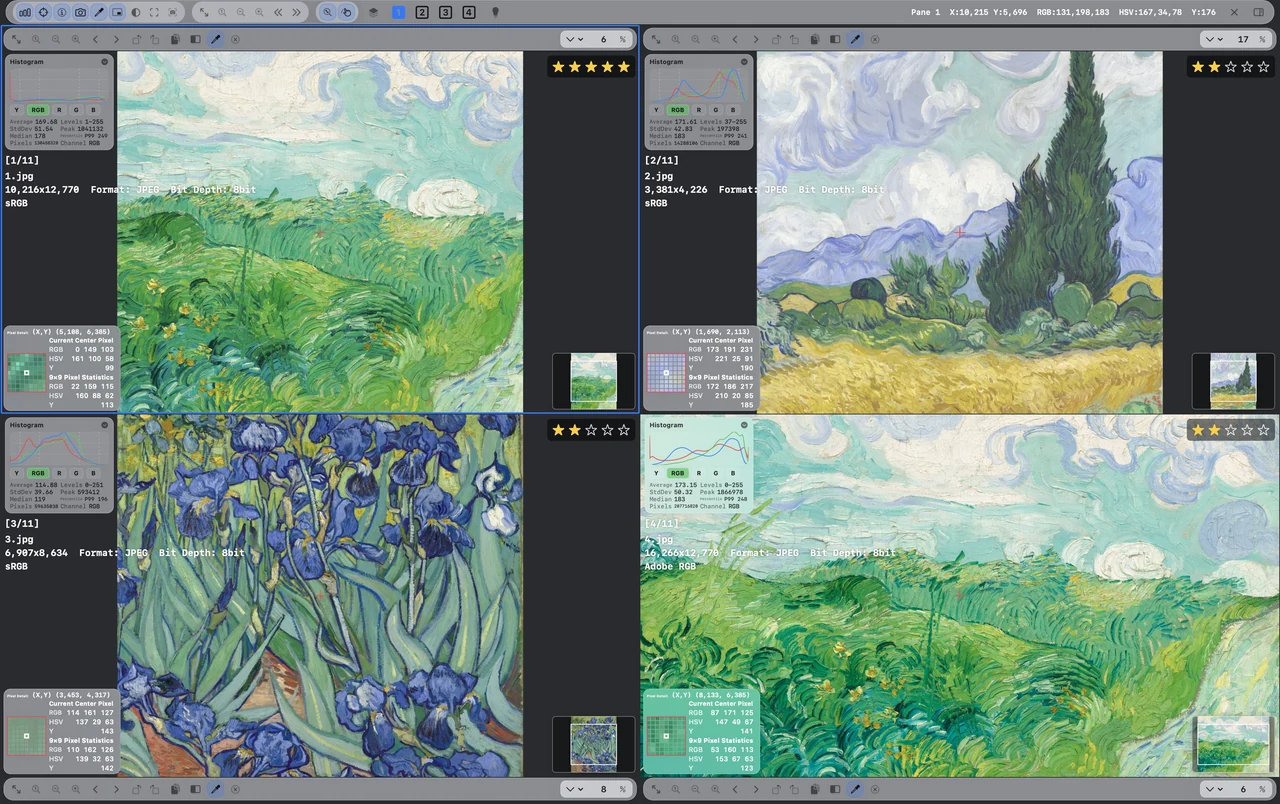
Three images, together.三图并排,直观比较。3 枚を、横に並べて。Tres imágenes, juntas.

Keep three images aligned in one view, with metadata and histograms close at hand.三张图片并排查看,结合元数据与直方图,清晰比较画面及数据差异。3 枚を並べ、メタデータとヒストグラムも合わせて確認できます。Alinea tres imágenes con metadatos e histogramas a mano.

Four views, in balance.四图对照,布局从容。4 枚を、バランスよく。Cuatro vistas, en equilibrio.

Use a two-by-two comparison layout and synchronized navigation to examine four candidates.两行两列的四图布局,配合同步操作,兼顾整体与局部观察。2 × 2 のレイアウトと同期操作で、4 つの候補を確認できます。Examina cuatro candidatos en una cuadrícula de dos por dos con navegación sincronizada.

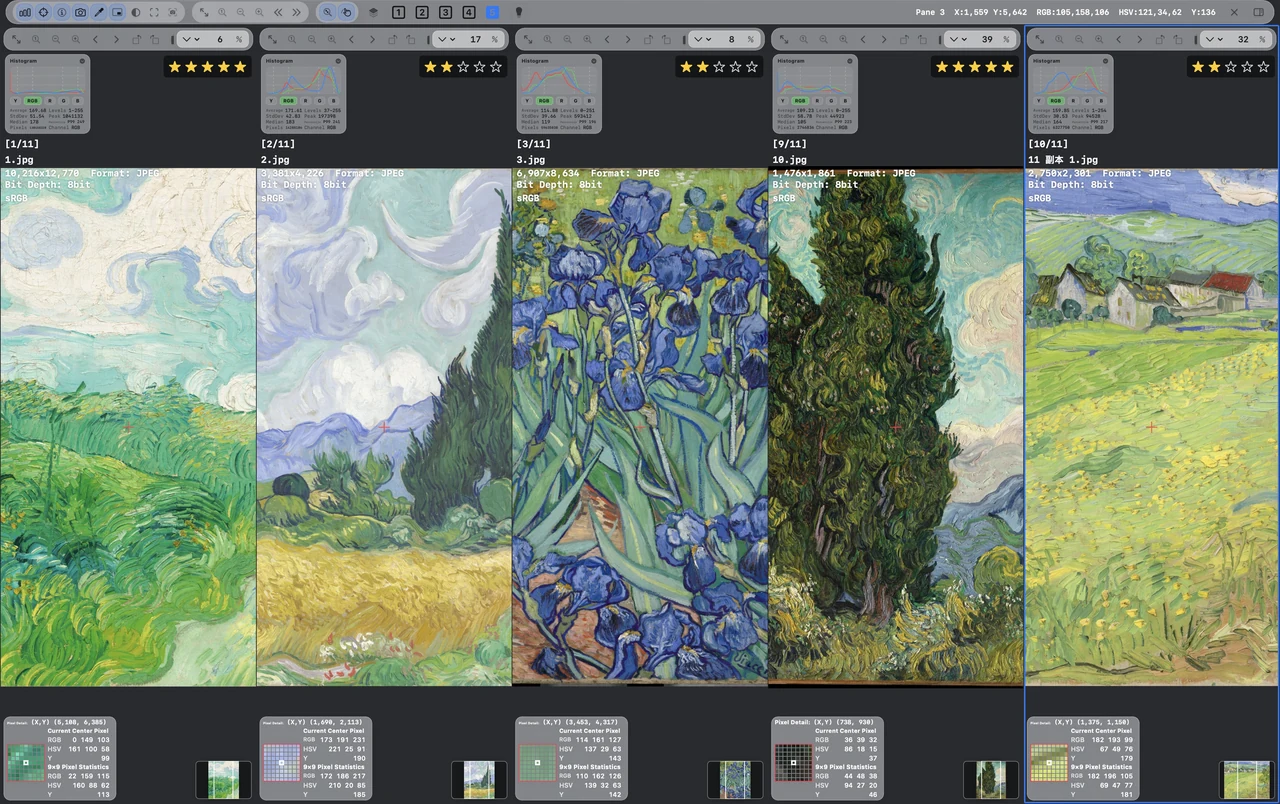
Five candidates, a wider view.五张候选,视野更完整。5 枚で、比較の幅を広げる。Cinco candidatos, más perspectiva.

Compare five candidates in one workspace while keeping independent image controls available.五张候选同屏比较,保留每张图片的独立操作,同时观察更多版本。5 枚を一画面で比較。それぞれの画像を個別に操作できます。Compara cinco candidatos en un espacio con controles individuales para cada imagen.

Shape the light with curves.用曲线,塑造明暗层次。カーブで、光を整える。Da forma a la luz con curvas.

Edit curves with histogram feedback and tonal ranges. Follow the direction of each adjustment as you work.结合直方图与明暗分区调整曲线,观察变化方向,更直观地控制画面的明暗层次。ヒストグラムと明暗域を見ながらカーブを調整。変化の方向を確認できます。Edita curvas con histogramas y rangos tonales para seguir cada ajuste de luz.

Color channels, finely tuned.逐通道调整,色彩更精细。色チャンネルを、細かく調整。Canales de color, al detalle.

Adjust individual RGB channel curves and inspect their histograms to refine the image color.分别调整 RGB 通道曲线,结合对应直方图,精细控制画面色彩。RGB チャンネルごとのカーブとヒストグラムで、色を細かく整えられます。Ajusta las curvas de cada canal RGB con sus histogramas para afinar el color.

Tone, with room for detail.明暗细节,调得恰到好处。明暗の細部まで、整える。Tono con espacio para el detalle.

Work with white balance, tone, curves and levels. Check the original and prepare a 16-bit TIFF export.白平衡、色调、曲线与色阶相互配合,随时查看原图,支持 16-bit TIFF 导出。ホワイトバランス、トーン、カーブ、レベルを組み合わせ、元画像の確認や 16-bit TIFF 出力も可能です。Combina balance de blancos, tono, curvas y niveles, consulta el original y exporta TIFF de 16 bits.

The right color, in the right place.选中色彩,定向调整。狙った色を、狙った場所で。El color preciso, donde lo necesitas.

Pick a color range in the Color Editor and refine its hue, saturation and lightness with the HSL mixer.通过色彩编辑器选取颜色范围,结合 HSL 调色,定向控制色相、饱和度与明度。カラーエディタで色域を選び、HSL で色相・彩度・明度を調整できます。Selecciona un rango con el editor de color y ajusta tono, saturación y luminosidad con HSL.

Liquify. A touch of control.液化工具,细节随心塑造。ゆがみを、自在にコントロール。Licuar, con control.

Push, smooth, twirl, pucker or bloat with the liquify brush. Freeze regions to protect the areas you want to keep.向前变形、平滑、旋转、褶皱与膨胀,多种液化笔刷灵活调整;冻结区域,保护不想改变的部分。押す、滑らかにする、回転、収縮、膨張などのブラシを使い、固定領域を保護できます。Deforma, suaviza, gira, contrae o expande con el pincel. Congela regiones para protegerlas.

Rank the image, not its name.匿名 Rank,让画面说话。名前ではなく、画像を評価。Evalúa la imagen, no su nombre.

Rank anonymous candidates and randomize group or pane order. Reset the current group if you want to start its ranking again.匿名比较候选,随机化组与窗口顺序,减少名称暗示。当前组可重置排位,重新作出判断。匿名の候補とランダムな表示順で評価。現在の組の順位はリセットしてやり直せます。Ordena candidatos anónimos con grupos o paneles aleatorios. Reinicia la clasificación del grupo actual cuando lo necesites.

Crop and resize, ready at hand.裁剪与缩放,顺手完成。切り抜きとサイズ変更も、手元で。Recorta y redimensiona, al instante.

Crop an image and resize its output in the same app. Prepare the dimensions you need before sharing.在应用内完成裁剪与缩放,按所需尺寸准备图片,轻松衔接分享与输出。同じアプリで切り抜きとサイズ変更。共有前に必要なサイズを整えられます。Recorta y cambia el tamaño en la misma app para preparar tus imágenes antes de compartir.

Bring order to your image names.批量重命名,整理更省心。画像の名前も、まとめて整理。Pon orden en los nombres.

Rename a selection with consistent rules. Keep a large image folder easier to browse and organize.为选中的图片按统一规则批量重命名,让大量图片的查找与整理更顺手。選択画像を統一ルールで一括名前変更。大量の画像も整理しやすくなります。Renombra una selección con reglas coherentes y organiza carpetas con muchas imágenes.

Measure the detail. Compare with confidence.局部有数,比较有据。細部を測って、確かな比較を。Mide el detalle. Compara con precisión.

Select a corresponding region across images and compare its average RGB, HSV and luminance Y values. The region preview and image histogram add context to your color and brightness decisions.框选多图中的对应区域,比较区域平均 RGB、HSV 与亮度 Y 数值。结合选区预览和图像直方图,让局部色彩、明暗与版本差异的判断更有依据。複数画像の対応する領域を選び、平均 RGB、HSV、輝度 Y を比較。領域プレビューと画像のヒストグラムを合わせて、色や明るさの違いを確認できます。Selecciona una región correspondiente en varias imágenes y compara sus valores medios RGB, HSV y luminancia Y. La vista de la región y el histograma de la imagen aportan contexto al color y al brillo.

Color, in full view.色彩调整, 一目了然。色の調整を、 ひと目で。El color, a la vista.

Shape tone with curves and levels, then refine a selected color in the visual color editor. Keep the image, histogram and adjustments together.通过曲线与色阶调整明暗,在可视化色彩编辑器中选择并精调颜色。图像、直方图和调节工具,同屏呈现。カーブとレベルで明暗を整え、視覚的なカラーエディタで選んだ色を微調整。画像、ヒストグラム、調整ツールを同じ画面で確認できます。Ajusta los tonos con curvas y niveles y afina un color seleccionado en el editor visual. La imagen, el histograma y los controles, juntos.

20-second color grading demonstration · English interface20 秒真实调色演示 · 英文界面20 秒のカラー調整デモ · 英語インターフェースDemo de color de 20 segundos · Interfaz en inglés